


You’ve probably heard so much about the recently released Bluetooth 5.
You’ve seen all the hype on 2x Speed, 4x Range, and 8x Advertising data increase capabilities.
But what does this all mean?? How does it achieve all these improvements? Is it really possible to achieve all these simultaneously?? What about power consumption? How is that affected?
Look:
There was so much media hype surrounding the release of Bluetooth 5, and lots of conflicting information with very few details. Many media articles made it sound like you can achieve all these simultaneously!
In this first post of a series on Bluetooth 5, I’ll go ahead and demystify all these facts for you as well as cover Bluetooth 5 Advertisements in detail.
The goal with this series of blog posts is:
- Fully understand the 3 main improvements that Bluetooth 5 achieves (Speed, Range, and Advertisements).
- Know which of these will benefit your application/use-case the most.
- How you can utilize the new improvements of Bluetooth 5 to your advantage.
- How to determine whether a BLE chip/module supports the new features you’re interested in utilizing.
- Which applications and use cases will benefit from each of these improvements.
- Have a full example of implementing each of these features on a chosen platform.
First, let's make it clear that Bluetooth 5 does not achieve both increased range and speed simultaneously - in fact, you will absolutely sacrifice speed in favor of range and vice versa!
A few things to note:
- Not all these new Bluetooth 5 features require new hardware.
- Some vendors will provide software updates to support some of these new features of Bluetooth 5 (for features that don't require a hardware update).
- Vendors can claim Bluetooth 5 support, but they won’t necessarily support the popular improvements, so be careful when choosing a module/chip with the intention of utilizing higher speeds or extended range. According to the spec section Volume 1, Part A, 1.2:
The mandatory symbol rate is 1 megasymbol per second (Msym/s), where 1 symbol represents 1 bit therefore supporting a bit rate of 1 megabit per second (Mb/s), which is referred to as the LE 1M PHY. The 1 Msym/s symbol rate may optionally support error correction coding, which is referred to as the LE Coded PHY.
An optional symbol rate of 2 Msym/s may be supported, with a bit rate of 2 Mb/s, which is referred to as the LE 2M PHY.
Notice the “optional” keyword in both cases of the LE 2M PHY (achieving 2x speed) and LE Coded PHY (achieving longer range via Forward-Error Correction).
PHY is the term used to refer to the Physical Layer of Bluetooth technology. For more info on the term, refer to the Wikipedia article on PHY.
So, let's take a look at what's new with Bluetooth 5.0 (compared to 4.2 and earlier versions). Several new features are introduced in the Bluetooth Core Specification 5.0 Release (compared to version 4.2):
- Slot Availability Mask (SAM)
- 2 Msym/s PHY for LE
- LE Long Range
- High Duty Cycle Non-Connectable Advertising
- LE Advertising Extensions
- LE Channel Selection Algorithm #2
We will start by talking briefly about the new higher speed 2 Msym/s PHY and the Long Range feature (utilizing the Coded PHY). After that, we will go deep into Bluetooth 5 Advertisements in general as well the new LE Advertising Extensions feature. In upcoming posts, we'll go over each of the longer range and higher speed features in more detail.
We will also go over how to implement Extended Advertisements on the nRF52840 Preview Development Kit using the nRF Connect SDK (which is based on Zephyr RTOS) using nRF Connect for Desktop's Bluetooth Low Energy app.
Bonus: Download my free report on the 5 Essential Bluetooth Low Energy Tools which help you develop for BLE in the most efficient manner.
How Bluetooth 5 increases speed to 2x and range to 4x
With the addition of the new 2 Msym/second PHY, Bluetooth 5 can now transfer data at 2x the rate of the original 1 Msym/s PHY. There are three PHYs in Bluetooth 5:
- 1 Mbps PHY: This PHY is mandatory and is uncoded (modulated at 1 Megasymbol/sec). Uncoded means that each symbol is represented by exactly one bit, so a theoretical data rate of 1 Megasymbol/sec equates to 1 Mbps of data.
- 2 Mbps PHY: This is uncoded as well (modulated at 2 Megasymbol/sec), and helps achieve the higher speed (2 Mbps) than Bluetooth 4.2.
- Coded PHY: This is also modulated at 1 Megasymbol/sec. By using a coding technique, the data can be error-corrected on the receiving end (to a given extent). This helps achieve the longer range in Bluetooth 5 - we are simply increasing the receiver sensitivity rather than changing transmit power on the transmitter side.
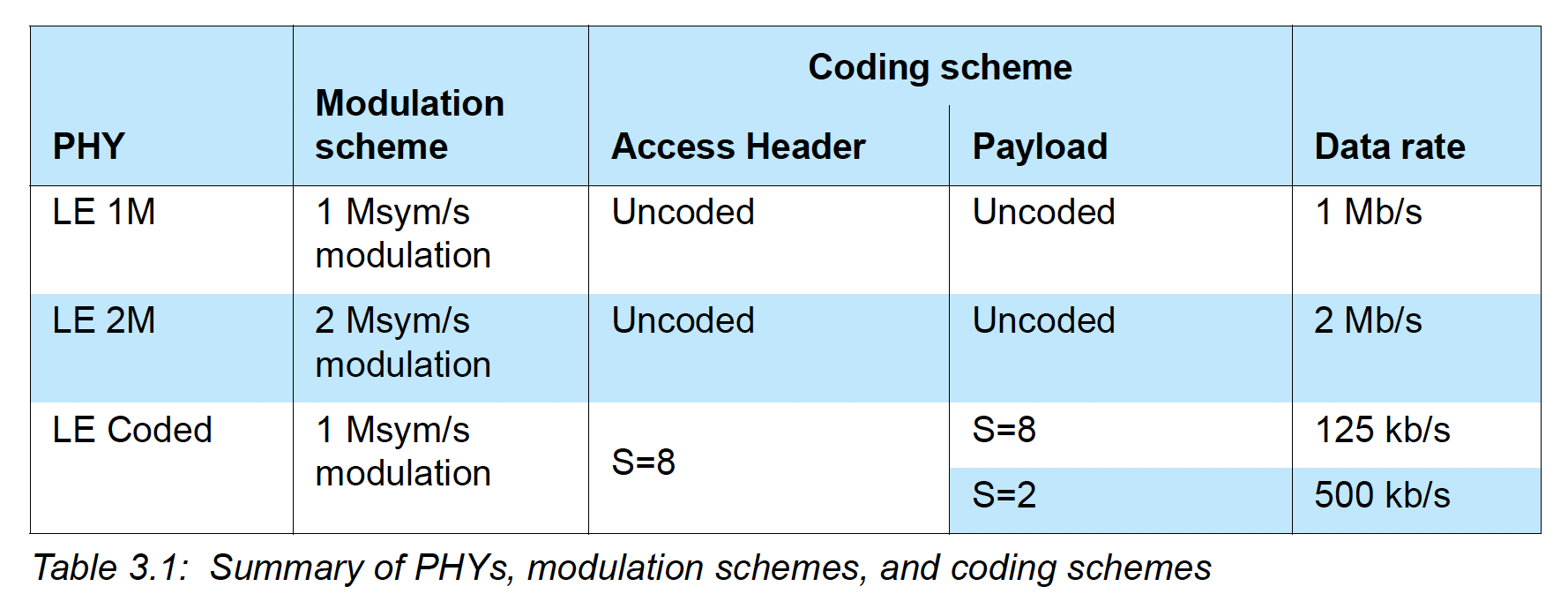
This following figure from the official spec better explains this:
There are certainly trade-offs for choosing one of these PHYs over the other (there are also restrictions on where each can be used). In addition to the increased speed, the new 2M PHY also reduces power consumption since the same amount of data is transmitted in less time reducing the radio-on time. Coexistence is also improved because of the less radio-on time.
The benefit of using the LE Coded PHY is increased range with the trade-off of both higher power consumption and reduced speed (down to 125kbps or 500 kbps depending on the coding used S=2 vs. S=8).
Here are a few videos showing both the longer range and higher speed features of Bluetooth 5 by Nordic Semiconductor and Texas Instruments:
Bluetooth 5 Advertisements
Bluetooth Low Energy uses 40 different frequency channels (PHY channels), separated by 2 MHz. Three (3) of these channels are called Primary Advertisement channels, while the remaining 37 channels are used for Secondary Advertisements as well as Data channels for transfers during a connection. Advertisements are used by devices to broadcast data and info for other observer devices to discover and process. It allows the device to broadcast this information for multiple devices to discover without a connection between the observers and broadcaster.
Advertisements always start with advertisement packets sent on the 3 primary channels (or a subset of these channels). Extra information can then be offloaded to the Secondary advertisement channels to allow for more data to be broadcast. There's also an additional mode called Periodic Advertisement that allows a scanner or observer to be synchronized with the advertisements sent continuously by the broadcaster.
The two main categories of advertisements are:
- Legacy Advertisements (same advertisements from the previous versions of Bluetooth Low Energy 4.0, 4.1, 4.2 and also exist in 5.0). They include the following types of PDU (Protocol Data Unit):
- ADV_IND
- ADV_DIRECT_IND
- ADV_NONCONN_IND
- ADV_SCAN_IND
- Extended Advertisements (introduced in Bluetooth 5). These can be utilized for sending more data than the legacy advertisements allow. They can also be used to initiate Periodic Advertisements. Extended Advertisements can only be discovered by devices that support this feature. They include the following types of PDU (Protocol Data Unit):
- ADV_EXT_IND
- AUX_ADV_IND
- AUX_SYNC_IND
- AUX_CHAIN_IND
To better understand the different advertising PDUs and which PHY is allowed for each, we refer to the spec (Volume 6, Part B, Section 2.3):
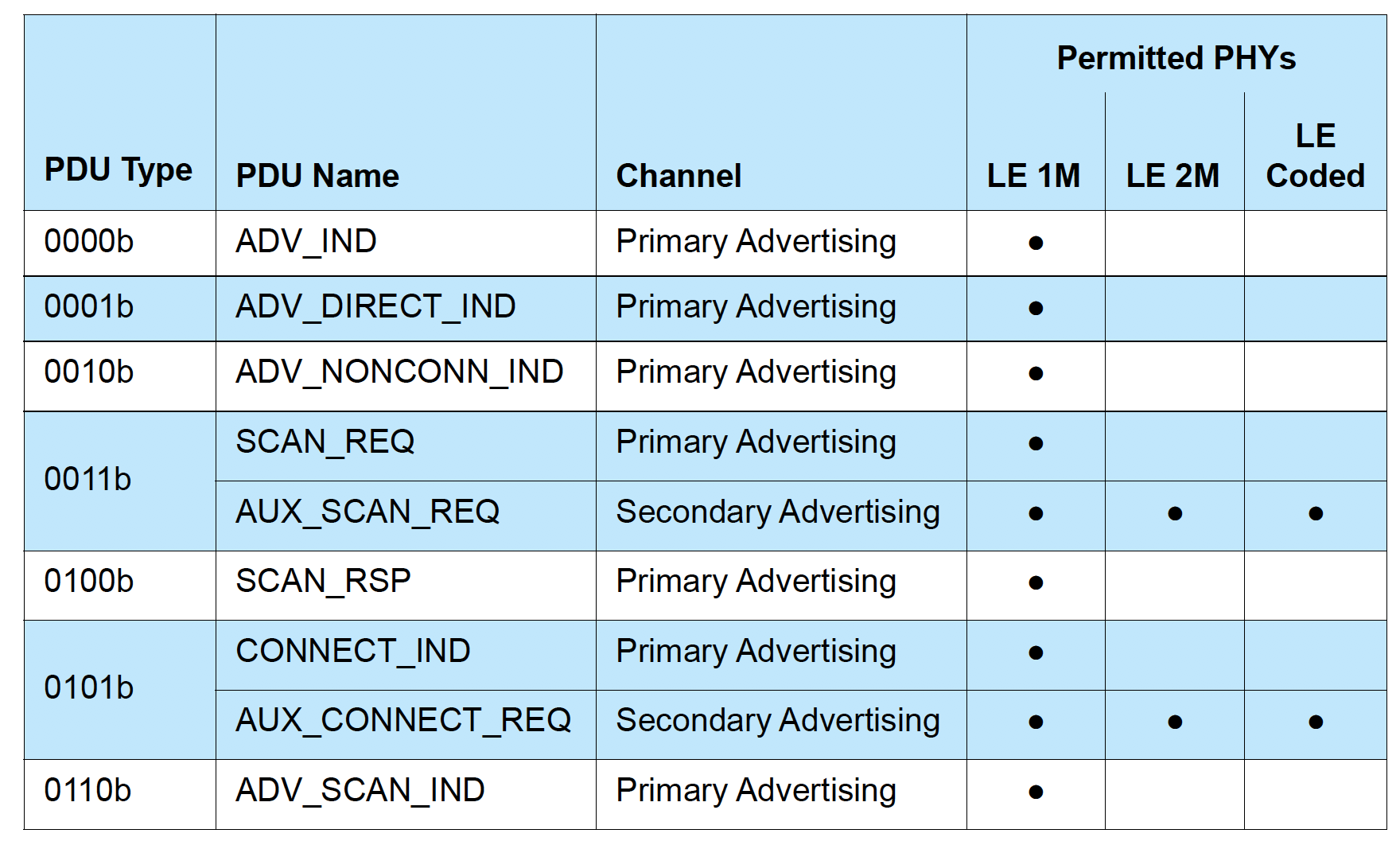
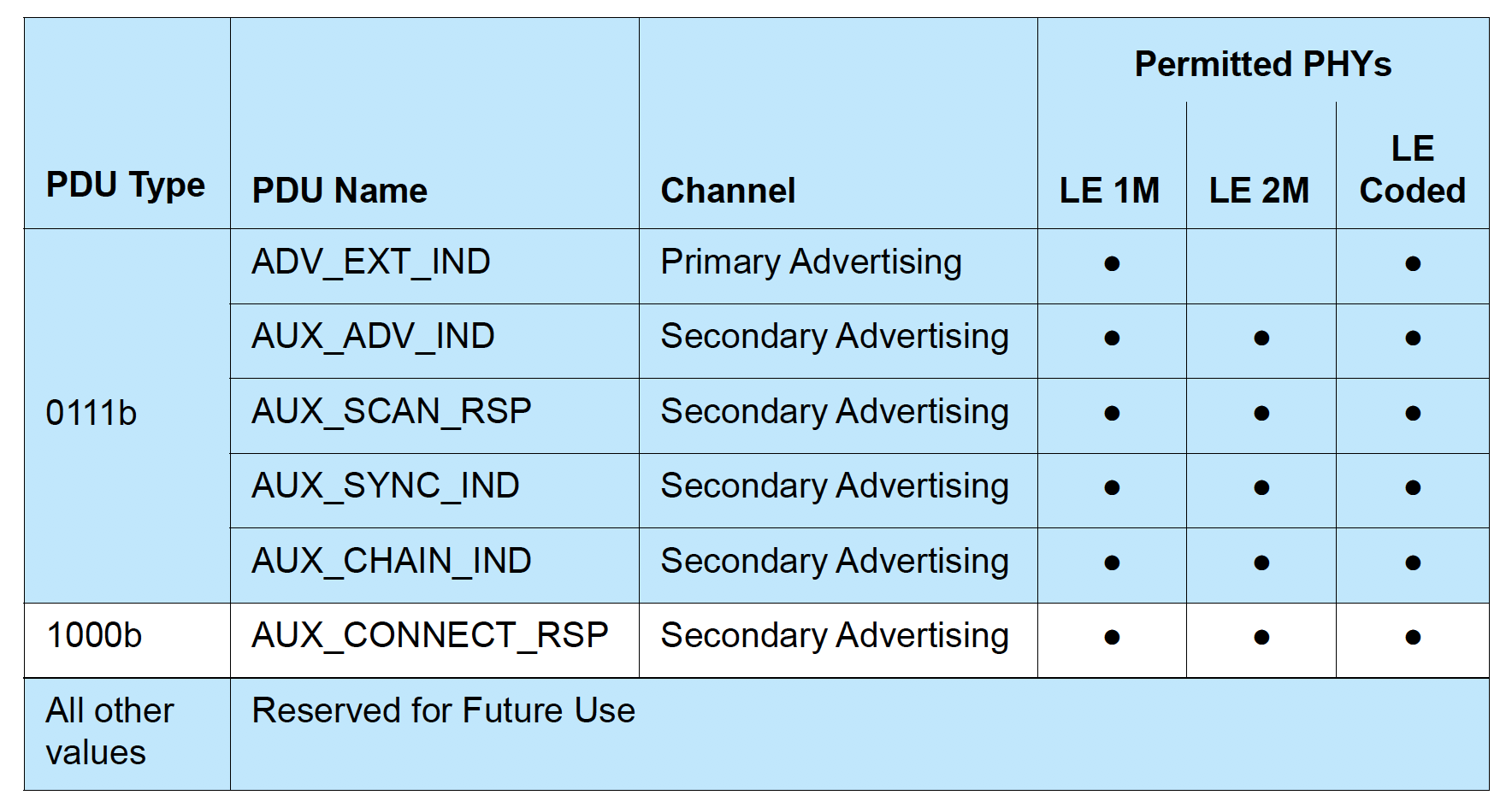
This table lays out the PHYs can be used for each of the Advertising PDU Types. You will notice that all the legacy advertisement PDUs we listed can only be sent on the original LE 1M PHY, and that the only Primary Advertisement PDU that can be sent on anything other than the 1M PHY is the ADV_EXT_IND (which is the only case where one of the new PHYs can be used on the primary advertising channels). All others are Secondary Advertising packets and can be sent on any of the three PHYs.
To better understand where each of these PDU types is used, let's look at another table from the Bluetooth 5.0 Spec (Volume 6, Part B, Section 4.4.2, Table 4.1):
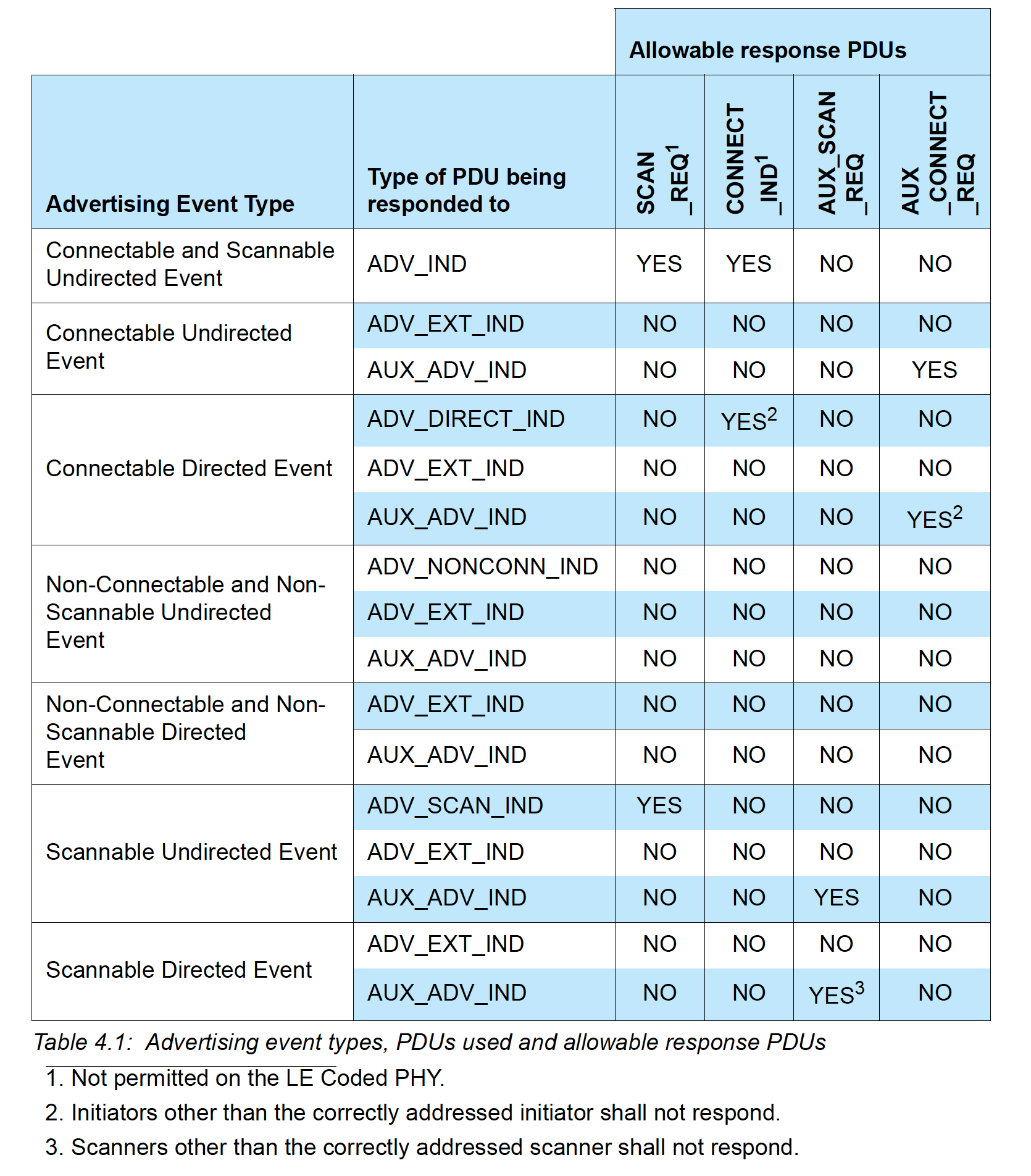
You'll notice that the only Advertising Event that does not allow ADV_EXT_IND is the Connectable and Scannable Undirected Event. For this advertising event type, ADV_IND is the only type allowed.
A few notes about the two types of advertising channels:
Primary advertisement channels
- Set of 3 fixed PHY channels (channels 37, 38 & 39)
- Divided into advertising events where each event can occur on each of the 3 advertising PHY channels (or a subset)
- Consecutive events start with the first advertising PHY channel (e.g. if advertisements start with channel 37, then each event will start with an advertisement packet sent on channel 37)
- Events occur at regular intervals
- Some advertising devices allow scan requests or connection requests on the same advertising PHY channel
- The advertising device can send a scan response packet on the same advertising PHY channel within the same advertising event
Secondary advertisement channels
- Set of 37 fixed PHY channels (same as the data channels used during a connection - channels 0-36)
- Not part of the advertisement event, but rather part of the extended advertisement event
- Begin at the same time as the advertisement event on the primary channel and end with the last packet on the secondary channel
- Used to offload data that would otherwise exist on the primary channel
- They are called “auxiliary packets”
- An advertisement packet on the primary channel contains the PHY channel and the offset to the start time of the extended advertisement packet
- Secondary advertisement channel can use any LE PHY (Uncoded 1M PHY, Uncoded 2M PHY, or Coded S=8 or S=2 PHY)
- All advertising packets in the secondary channel should use the same PHY
Bluetooth 5 Extended Advertisements
Extended Advertisements are a way to advertise more (offloaded) data than what's allowed with Legacy Advertisements. Offloading is accomplished by first advertising on the primary channel that points to an auxiliary packet on the secondary channel.
Note: Since non-Bluetooth 5 devices will not be able to discover extended advertisements, it is recommended that advertisers also use an advertising set with legacy advertising PDUs for older scanning devices to be able to discover the end device.
Advertising sets are used to send out different types of advertising events simultaneously. Each advertisement set will have different advertisement parameters such as advertising PDU type, advertising interval, and PHY.
When advertising on the LE Uncoded 1M PHY:
- Scan requests and responses can take place on the same PHY channel as the original advertisement or be offloaded to the secondary channel.
- In some cases when advertising on the Uncoded PHY, connection requests and responses are offloaded to the secondary channel.
When advertising on the LE Coded PHY:
- Scan requests, scan responses, connection requests, and connection responses ARE ALWAYS offloaded to the secondary channel.
Periodic Advertisements
Another feature of Bluetooth 5 Extended Advertisements is Periodic Advertisements. These are used for broadcasting packets to devices at a set period between two unconnected devices, meaning that more than one device can listen and tune in on these periodic advertisements. They consist of advertisements sent at a fixed interval with the advertisement data changing from time to time.
The way this is accomplished is as follows (from the spec Volume 6, Part B, Section 4.4.2.3):
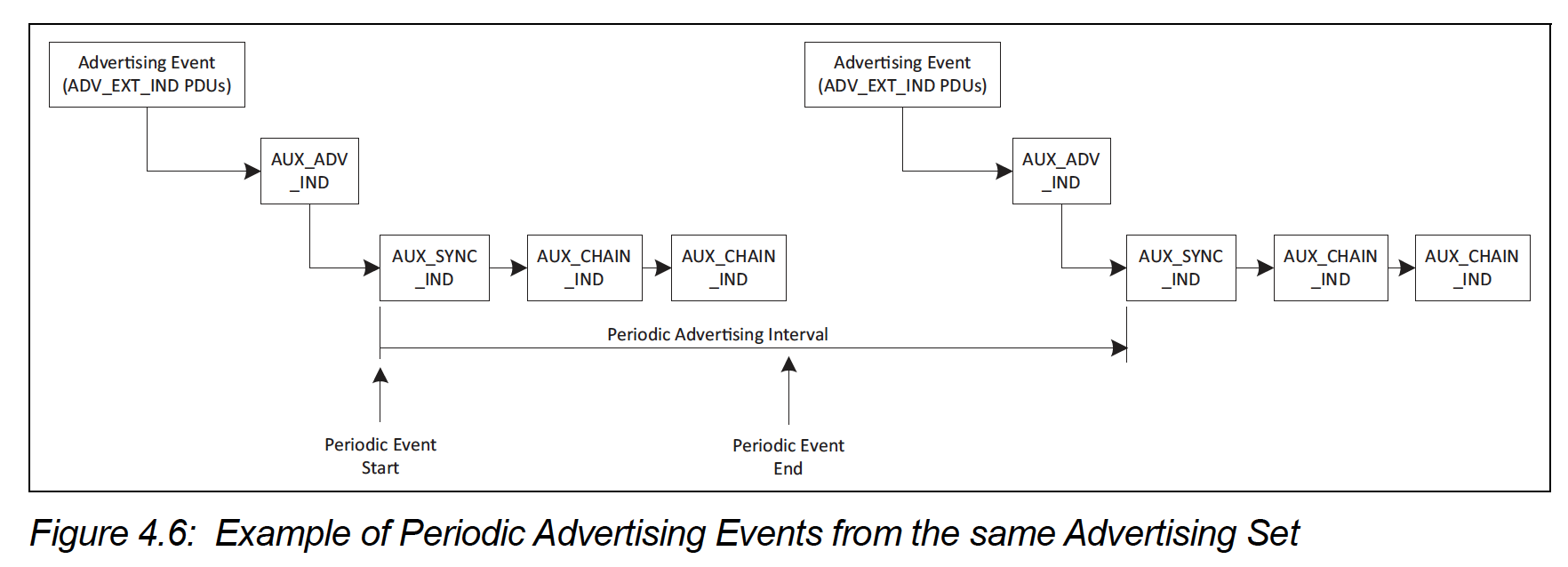
As you can see from the figure above, the primary advertisement channel is used to transmit the ADV_EXT_IND PDU type which holds information (Time offset, PHY...etc) that can be used to find the AUX_ADV_IND PDU packet. That packet, in turn, contains the SyncInfo field which defines the data needed to synchronize to the periodic advertisement packets (AUX_SYNC_IND and AUX_CHAIN_IND) in a way similar to how connections are formed (channel map, hop sequence, which PHY...etc).
Therefore, a scanner can target an advertising device by first discovering the advertisement event on the primary channel, and then tuning into the appropriate secondary channel and timing based on information sent in the primary advertisement packet.
How and when can you utilize Bluetooth 5 Advertisements?
No doubt that Beacon applications will benefit the most from extended advertisements. However, it will take time before you can practically utilize this feature since it will depend on the scanning devices (smartphones, tablets, PCs) supporting Bluetooth 5 Extended Advertisements.
Beacons can now broadcast more data and allow for a better user experience. Connectable devices can also utilize this to send more data and allow connections on the secondary advertising channels (which can help avoid interference and noise from other devices broadcasting on the primary channels).
The use of Periodic Advertisements can also help in making the broadcasting device more consistently discovered and monitored, with the possibility of the broadcast data being updated to reflect certain attributes and aspects of the broadcasting device (e.g. in the case where a scanning device is always present in the proximity of a broadcasting device, now this scanning device can more consistently "follow" the advertiser and monitor its updates more frequently).
Conclusion & Summary
Extended Advertisements (including periodic advertisements) is just one of the exciting new features of Bluetooth 5. Next time, I will cover another major feature included in Bluetooth 5: the new PHYs (2 Mbps PHY and the Long Range PHY which supports up to 4x the range of Bluetooth 4.2). Stay tuned!
To summarize what we covered today:
- Overview of Bluetooth 5 and its major improvements
- How Bluetooth 5 achieves higher speed and longer range
- General overview of Bluetooth advertising
- Types of Bluetooth 5 advertising channels
- In-depth look into Extended Advertisements and Periodic Advertisements
- Example code for sending extended advertisements using the nRF52840 Preview Development Kit
- Video showing the capture of these advertisements by a commercial Bluetooth 5 sniffer (Ellisys Bluetooth Tracker)
- How and when to utilize Extended Advertisements


