


In our previous post, we introduced some of the layers of the Bluetooth Low Energy protocol stack. Today, we will take a closer look at the ATT (Attribute) protocol and GATT (Generic Attribute Profile), two important protocol layers that allow data transfer during a connection-oriented communication mode.
If you are looking to transfer data between connected devices using LE, understanding the technical jargon around ATT & GATT is essential! So let's get started...
Quick Primer: How Devices Connect Using The GAP Layer
For Bluetooth LE-enabled devices to transmit data between each other, they must first form a communication channel. How this channel is formed and maintained is the responsibility of the GAP (Generic Access Profile).
The Generic Access Profile instructs that for two devices to connect and communicate, one must take the role of Central, and one must take the role of Peripheral.
The Central is typically a powerful device like a smartphone, while the Peripheral is often something that requires less power, like a fitness tracker.
And the journey to establishing a connection between the two starts like this:
Step 1:
When the device that wants to assume the peripheral role is ready to connect, it must enter the advertising state and begin announcing its presence by using its LE radio to broadcast advertising packets on the three primary advertising channels: 37, 38, and 39.
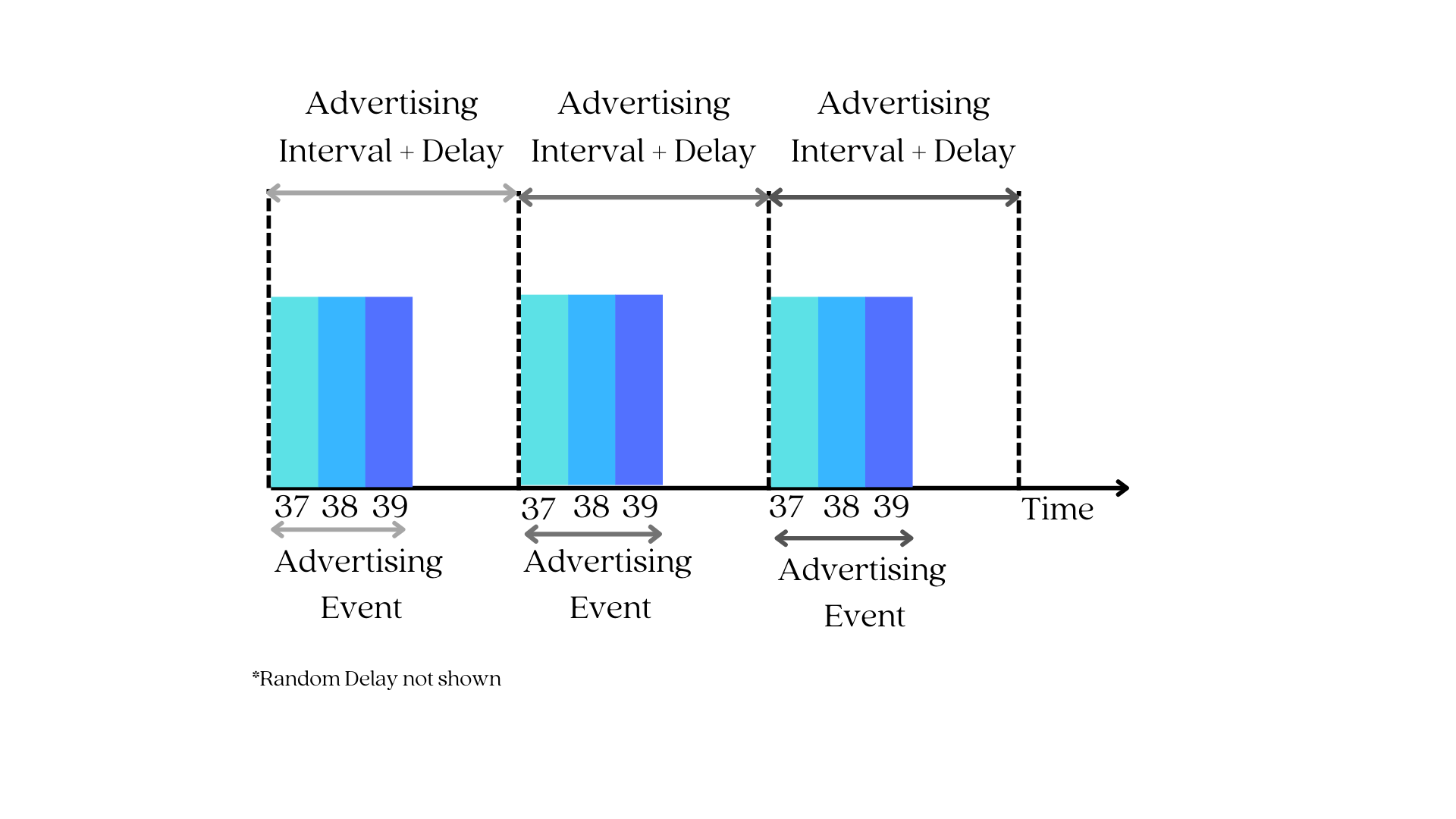
Note: Advertisement packets (PDUs) can also be sent on secondary advertisement channels (data channels) in Bluetooth 5 (or later), but they always start with advertising on the primary channels first. For the sake of simplicity, we'll focus on the primary advertising channels for the time being; alternatively, you can read a post we wrote about Bluetooth 5's features.
Step 2:
A device that wants to assume the Central GAP role must transition into a scanning state and listen on these three channels for an advertising packet.
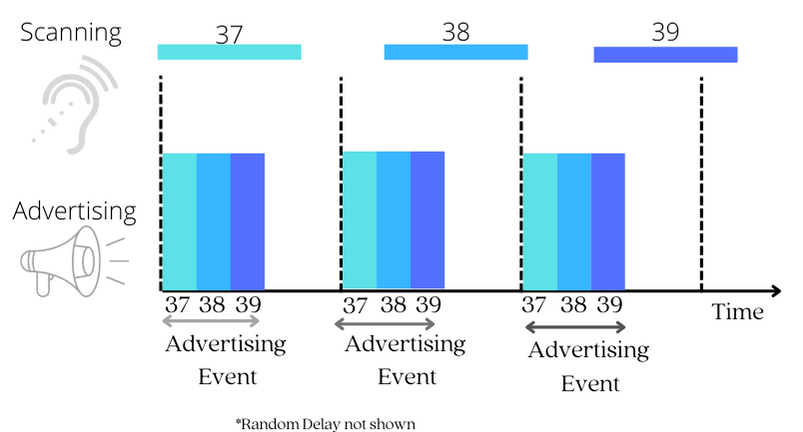
When the scanning interval coincides with an advertising event, something magical happens: the central device discovers the peripheral device!
Step 3:
When an advertising packet is detected, the next step is for the Central to initiate a connection to the Peripheral by sending a Connection request packet.
Between the two GAP roles, the device that supports the central GAP role is in charge of managing the connection and has the final say in the connection parameters.
We won't delve much into these connection parameters, but some of them include:
- Connection Interval - to specify how much time elapses between connection events
- Peripheral Latency - to specify how many connection events can be skipped by the peripheral device
- Channel Map - to specify which of the 37 available data channels will be used for transmission.
The Central device decides on these parameters and bundles them up into a connection request packet that it sends to the peripheral. After this act, we say the connection is created.
Then, the central device will then send a data packet to the peripheral device after a time interval known as a connection interval. If the peripheral device receives the data packet and responds by sending one back to the central device, the connection is now considered to be established.
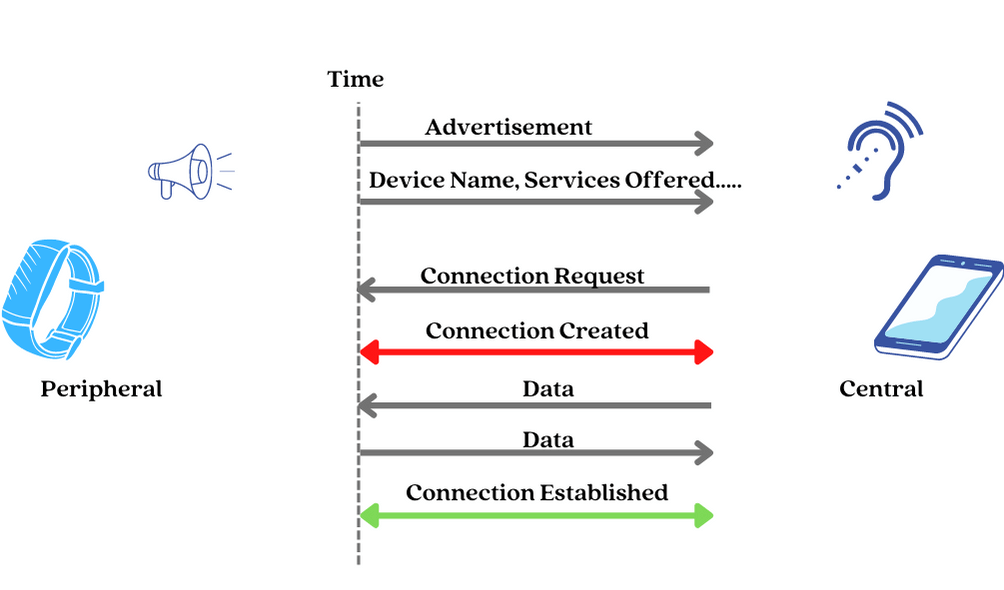
Step 4: Viola! We have a connection.
After establishing a connection, devices can have a persistent and synchronized bi-directional data transfer.
So, how exactly is this data transfer accomplished? How do devices talk to each other after they've established a connection?
This is where ATT & GATT play a vital role.
Attribute Protocol (ATT) - Roles
First, the ATT Protocol defines roles. And, yes, with each role comes specific responsibilities.
The roles defined by ATT are based on a client-server architecture, similar to the one used by the world wide web, where a device that is a provider of a resource or service is called a server, and the client is the consumer or requester of that resource or service.
- Server - The server acts as a database and stores data that can be read or written by the client. E.g., a fitness tracker will store the latest heart rate value.
- Client - which is the device that requests the data from the server. E.g., a smartphone connected to a fitness tracker.
Now, don't fall into the assumption that a device that supports a GAP Central role will automatically assume the Client ATT role, and the device that supports a GAP Peripheral role will automatically assume the Server ATT role. No, this isn't always the case.
The server and client ATT roles are independent of the GAP roles and can be played by any device at any time.
So, both devices in a connection can act as either a server or a client, depending on the context of the data being transferred.
To further understand this concept, let's take a look at an example from Android's Bluetooth guide: Imagine you have an Android smartphone that is connected to your fitness tracker.
When the tracker wants to report data to the phone, then it acts as the server, and the phone acts as the client. In this case, the tracker provides data (such as heart rate or steps taken) to the phone.
An example of when the phone acts as the server is for a SIG-adopted service called the Current Time Service. In this case, the phone will expose the current time information for the peripheral (e.g., tracker) to read and obtain.
Since the phone usually has an internet connection and can synchronize its clock to an accurate reference, it can easily provide this information to other devices that do not have access to the internet; the fitness tracker in this scenario.
Attribute Protocol (ATT) - Server Role and Attributes
As previously stated, the server device functions as a database to store the data that it needs to share with the client device.
For proper functionality, the server, like any other database, requires:
- A standard method to store and organize the data, and
- Standard mechanisms to access the data.
It is the responsibility of the ATT protocol to provide means for the server device to store data in a format that can be read and written by the client, as well as to provide mechanisms for the client to access, write, and read that data.
Attributes
The ATT protocol defines a data structure called an attribute as a standard method for effectively organizing the data stored, accessed, and updated on the server.
The attribute data structure has four fields:
- An Attribute Handle - This is a unique unsigned 16-bit identifier that is used by the client to reference an attribute on the server. It makes the attribute "addressable," and it does not change during a single connection.
- An Attribute Type (UUID) - This is a globally unique 2-byte or 16-byte UUID identifier that defines the type and meaning of the specific data stored in the attribute's value field. There are two types of UUIDs: Service UUID and Characteristic UUID.
- An Attribute Value - This is the actual data being stored. For example, the heart rate sensor reading value or temperature reading from a temperature sensor.
- An Attribute Permissions Field - It specifies the various methods that can be used to access the attribute value, as well as the security level required to access the attribute value. For example, an attribute may require no permissions to read but may require authentication to modify (write to) it.
On the server, data is organized as a table of attributes:
All attributes of an LE server are stored in its database by increasing the attribute handle value.
A successive attribute doesn't need to have the next integer handle value, and there can be gaps between handle values as long as they are in increasing order.
Attribute Access Methods
The ATT protocol also defines methods by which attributes can be read or written. The methods depend on whether it is the client or the server who initiates the attribute access procedure.
In the case where the client initiates attribute access, two operations are defined - The read and write operation.
They are pretty self-explanatory, but to recap:
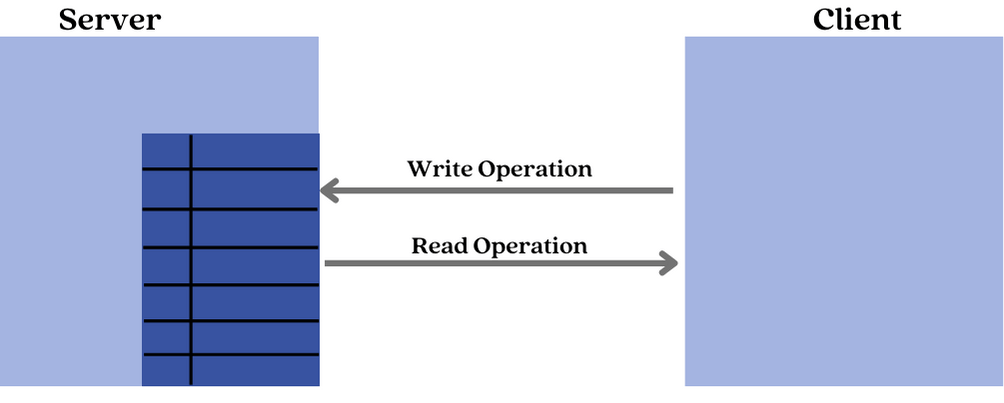
The Read operation is used by the client to read the value of an attribute from the server. The server responds with the value of the attribute.
The Write operation is used by the client to write the value of an attribute on the server. The server responds with a status indicating if the write was successful or not.
On the other hand, in the case where the server initiates access, two operations are defined: Notification and Indication operations.
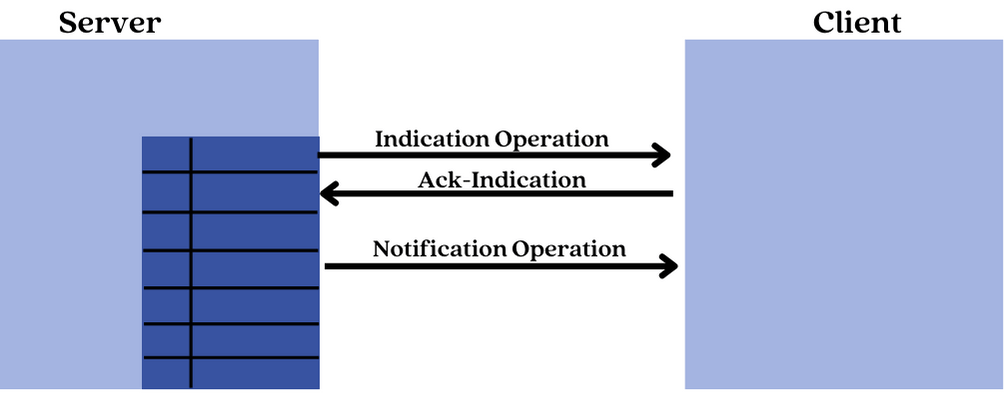
The Notification operation is used by the server to send an updated value of an attribute to the client every time it changes. The client does not respond to this operation.
The Indication operation is similar to the notification operation, but the client has to send back a response with an acknowledgment status indicating whether or not it has correctly received the value.
Attribute Access Permissions
Access permissions, like file permissions, determine whether a client can read or write (or both) an attribute value. Each attribute can be assigned one of the following access levels:
- None - A client can neither read nor write the attribute.
- Readable - A client can read the attribute.
- Writable - A client can write the attribute.
- Readable and writable - The client can read and write the attribute.
Regarding security requirements, the attribute types and handles are public information, but the value field and permissions are not.
As a result, in order for the client to access these two private fields, the server may require the following:
- Authentication to read or write
- Authorization to read or write
- Encryption and pairing to read or write
A Hierarchical Database Model
A hierarchical database model is a data model in which data is not organized sequentially but rather in a non-linear format to demonstrate the data's hierarchical relationship. This model uses a tree-like pattern to represent data.
This type of data model organizes data in a way that makes it faster to access and uses less memory.
Scaler Topics' example is arguably the best way to explain a hierarchical database model:
Assume John and Sarah are high school students.
Their teacher assigned them to provide a detailed list of the names of the Faculties in their year, as well as their departments.
John decides to create a table that includes each person's name, department, and designations.

Sarah, on the other hand, decides to draw a tree diagram showing all of the faculties and their designations:
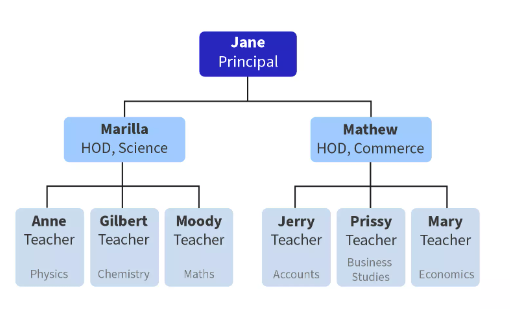
Q. Who do you believe will receive a higher grade in their assessment?
Sarah! She created a hierarchical database model, which allowed her to more easily visualize the structure of the data and understand the relationships between the different elements (faculty members).
The hierarchical model is an efficient way to organize data. As you can see, it efficiently organizes data into a hierarchy. This makes it easy to visualize the structure and relationship of the data elements.
ATT Server (A.K.A database)
As previously stated, the ATT protocol stores data as attributes in a table in a linear manner by sequentially increasing the handle number of the attribute.
But what if we want to indicate a relationship between the data stored on the server? Just like Sarah did in the previous example.
And, by relationship, we mean the one similar to a file and folder relationship found in a computer disk drive, where we intuitively understand that files in the same folder are related. This would make it easy to navigate through a complex database. Wouldn't you agree?
The GATT layer is in charge of defining a hierarchical data structure that demonstrates the relationship or connection between the data stored in an ATT server.
Let's take a look at how the GATT protocol layer is used to establish this relationship.
GATT (Generic Attribute Profile)
The GATT protocol layer defines a framework in which the resources (data) on a server's database can be organized to show a hierarchical relationship.
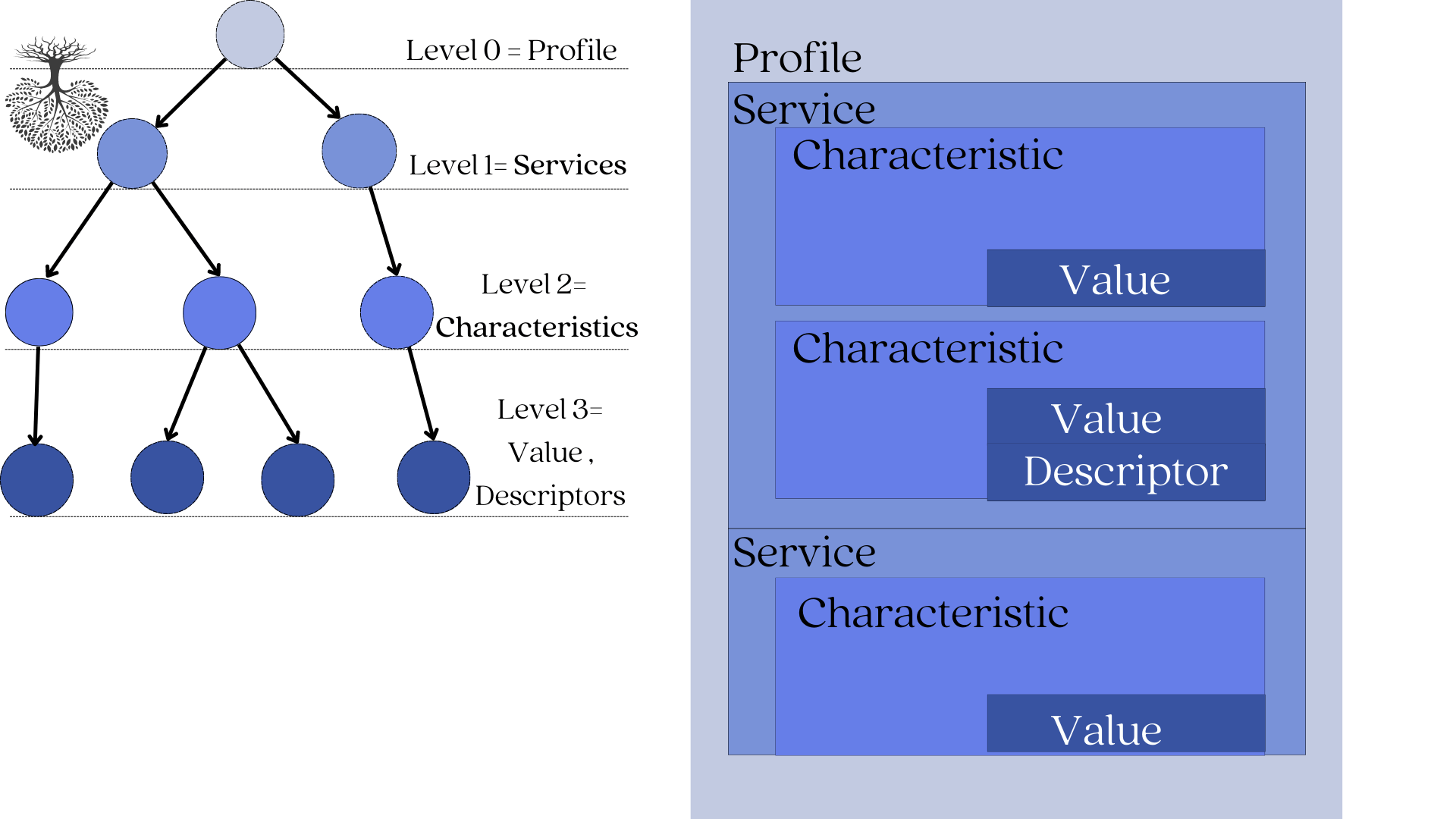
The GATT layer defines a 4-level tree-like framework:
- The root node is named the profile. (level 0)
- Children of the profile are named services. (level 1)
- Children of services are named characteristics. (level 2)
- And characteristics can be defined by a single value and 0-n descriptors (level 3)
Let's illustrate this in the image below:
1. Characteristic
A characteristic is a basic storage unit where the application data is "written" into and "read" from.
It is analogous to a file on a computer disc drive. We know that files are where all programs and data are written into or read from.
Every Characteristic is defined by :
- Value
- Descriptor (optional)
Characteristic Value - The actual application data stored.
Descriptors- A descriptor is optional information that tells you more about a characteristic's value. This might include a human-readable description, an acceptable range for the characteristic's value, or a unit of measure that is specific to the characteristic's value.
A very popular descriptor is the Client Characteristic Configuration Descriptor (CCCD). CCCD is used to enable or disable indications or notifications from a GATT server. By enabling notifications or indications on a particular characteristic, the client can be notified or receive updates whenever the characteristic value changes on the server.
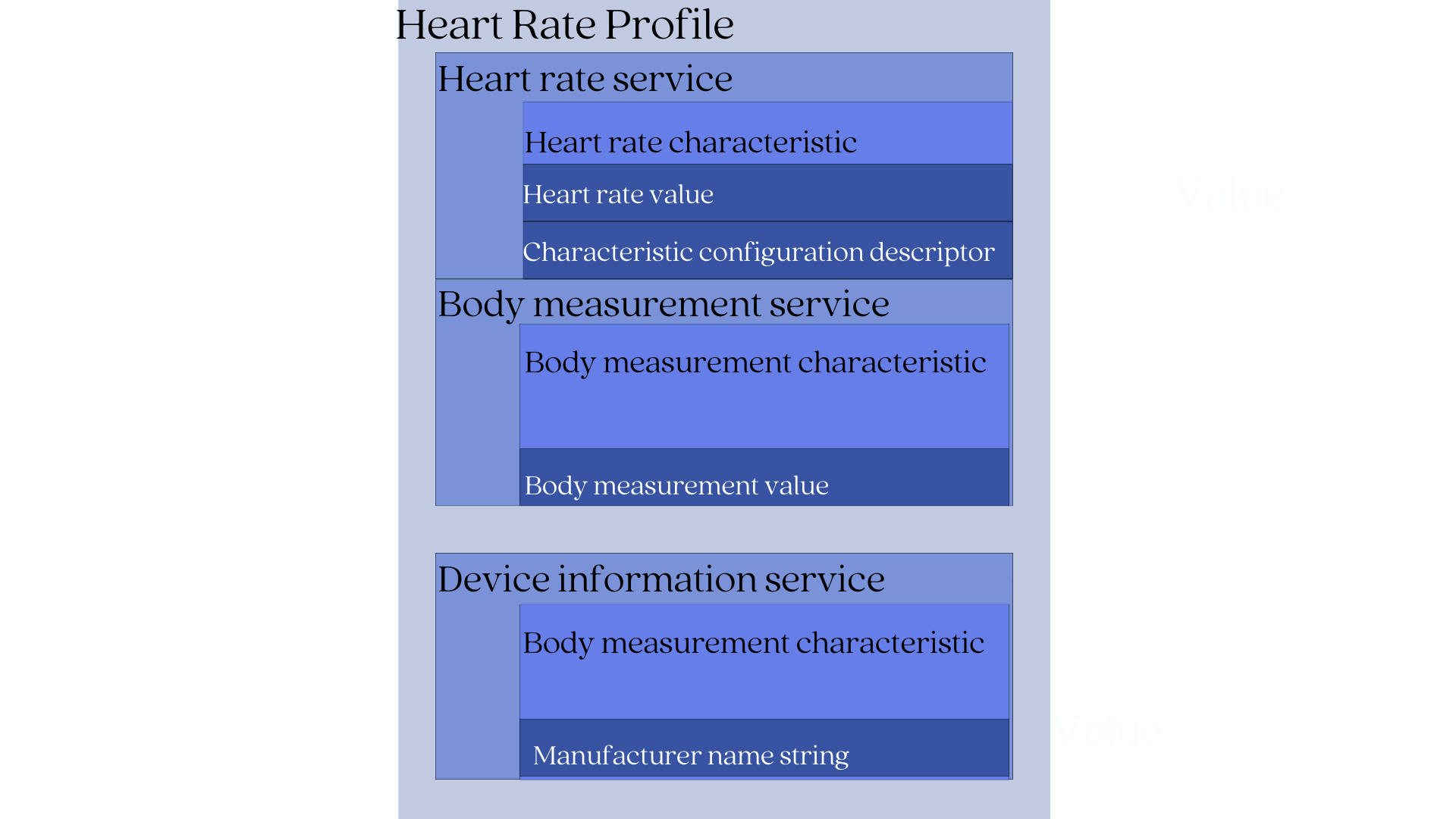
Let's look at a fitness tracker with a GATT Heart Rate Profile to see how the hierarchical relationship works.
According to the Heart Rate GATT profile, a device implementing it will contain:
- Heart rate measurement characteristic (mandatory)
- Body measurement characteristic (optional)
- Device information characteristic (optional)
The heart rate characteristic is defined by:
- Heart rate value- this is the actual heart rate sensor data.
- Characteristic configuration descriptor- this is for notification purposes so the client can be notified of changes to the heart rate value.
The body measurement characteristic is defined by:
- Body measurement value- this is used to describe the location of the body where the device is to be worn.
The Device information characteristic is defined by:
- Manufacturer name string- This is the name of the device's manufacturer.
2. Services
Services are primarily used for organization purposes rather than storage.
They are analogous to folders or drawers. Just like a folder houses related files, a service contains related characteristics.
For our fitness tracker example, its services will be:
- Heart rate service- This service includes the heart rate characteristic [heart rate value + Characteristic configuration descriptor].
- Body measurement service- This service includes the body measurement characteristic.
- Device information service- This service includes the device information characteristic.
3. Profile
On top of the hierarchy are the profiles, which contain services for a particular use case that the server supports.
Some services are optional, while others are required, but every device that conforms to a specific profile must implement all mandatory services (and characteristics). This is done to ensure that devices that support the same GATT profile can communicate with one another (interoperability).
For example, when a fitness tracker from manufacturer X claims to support the Heart Rate GATT profile. Then it's expected that :
- It will 100% contain the Heart Rate service
- It will 100% contain the Heart rate measurement characteristics.
This standardized way of organizing data has many benefits:
- Data is easy to find - When we know the structure of how the data is organized, client devices can quickly discover the services offered by the server and determine whether or not the services are relevant.
- Data is easy to share- When everyone agrees on how the data should be structured, it becomes much easier to exchange that data between devices.
- Promotes interoperability- When devices use the same profile, they can be sure that they will be able to communicate with each other.
In our fitness tracker example, its Heart rate profile contains the following services:
- Heart rate service (mandatory)
- Body measurement service (optional)
- Device information service (mandatory)
The GATT Profile Builds On The Functionality Of The ATT Protocol
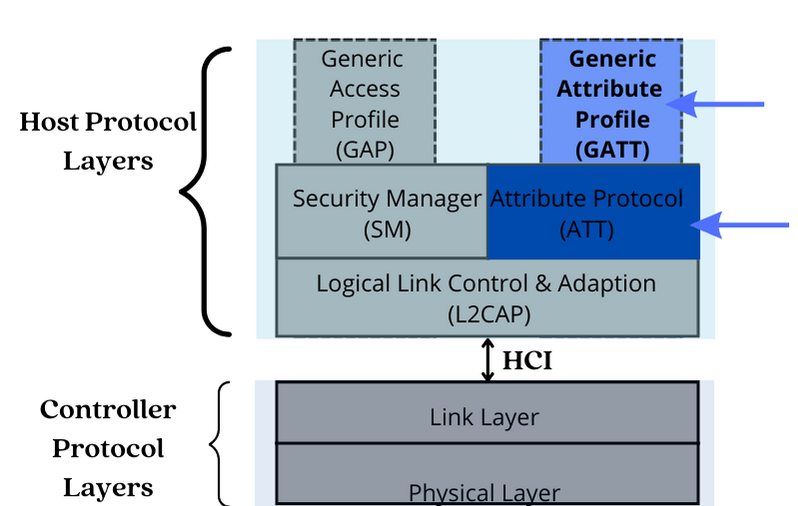
The GATT layer lies above the ATT (Attribute Protocol) layer in the Bluetooth Low Energy protocol stack. It reuses many of the concepts and functionality of the ATT layer.
1. GATT Reuses The ATT Client-server Architecture:
GATT layer uses the ATT client-server architecture. In this architecture, devices play either the role of a GATT client or a GATT server.
- GATT Server- This stores and sends requested data to the GATT client.
- GATT Client- A device that wants to access data on the GATT server. It is also used to discover all the primary services and characteristics offered by a GATT server.
In general, communication between the GATT client and the GATT server begins with the GATT client performing a service and characteristic discovery to find out: what services are offered by the GATT server and what characteristics are associated with each service.
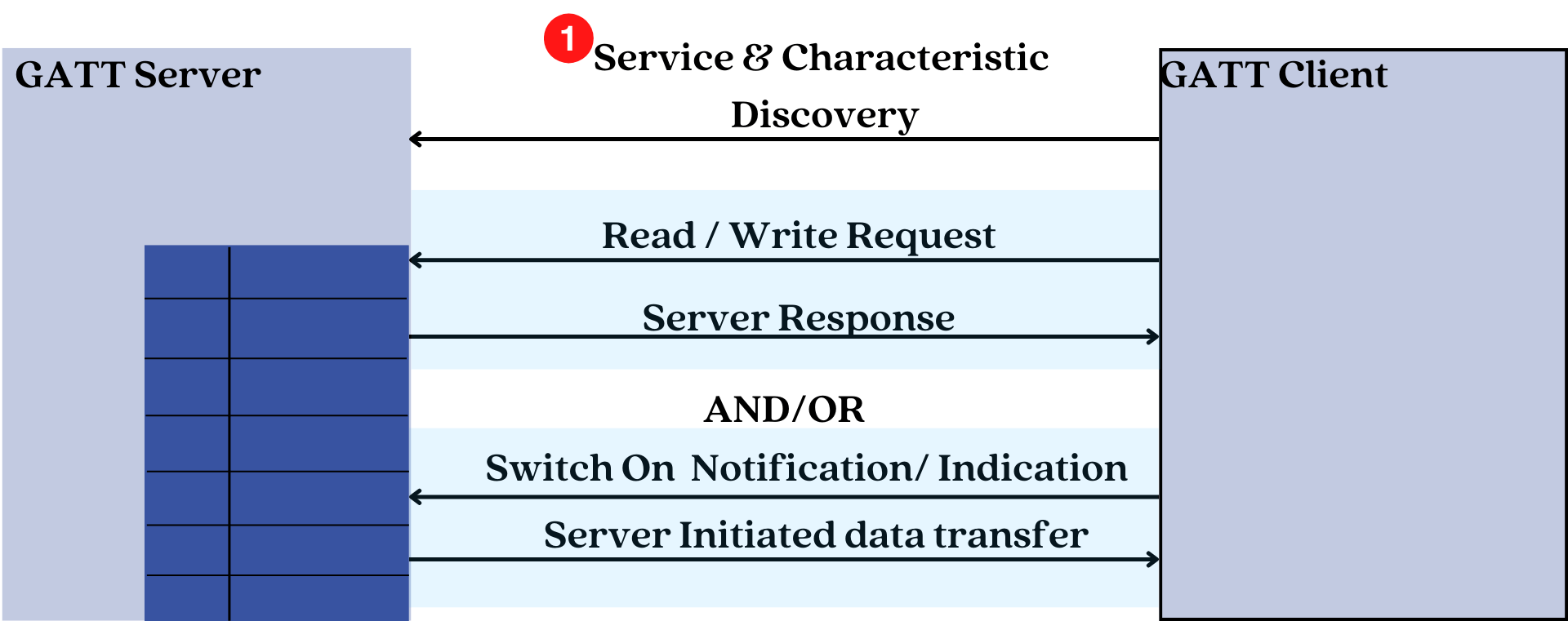
After the discovery process is complete, the GATT client can then read or write the values of certain characteristics that it is interested in or configure notifications to be sent by the GATT server whenever the value of characteristic changes.
2. GATT Reuses The ATT Attribute Data Structure
GATT uses the Attribute data structure to store services and characteristics.
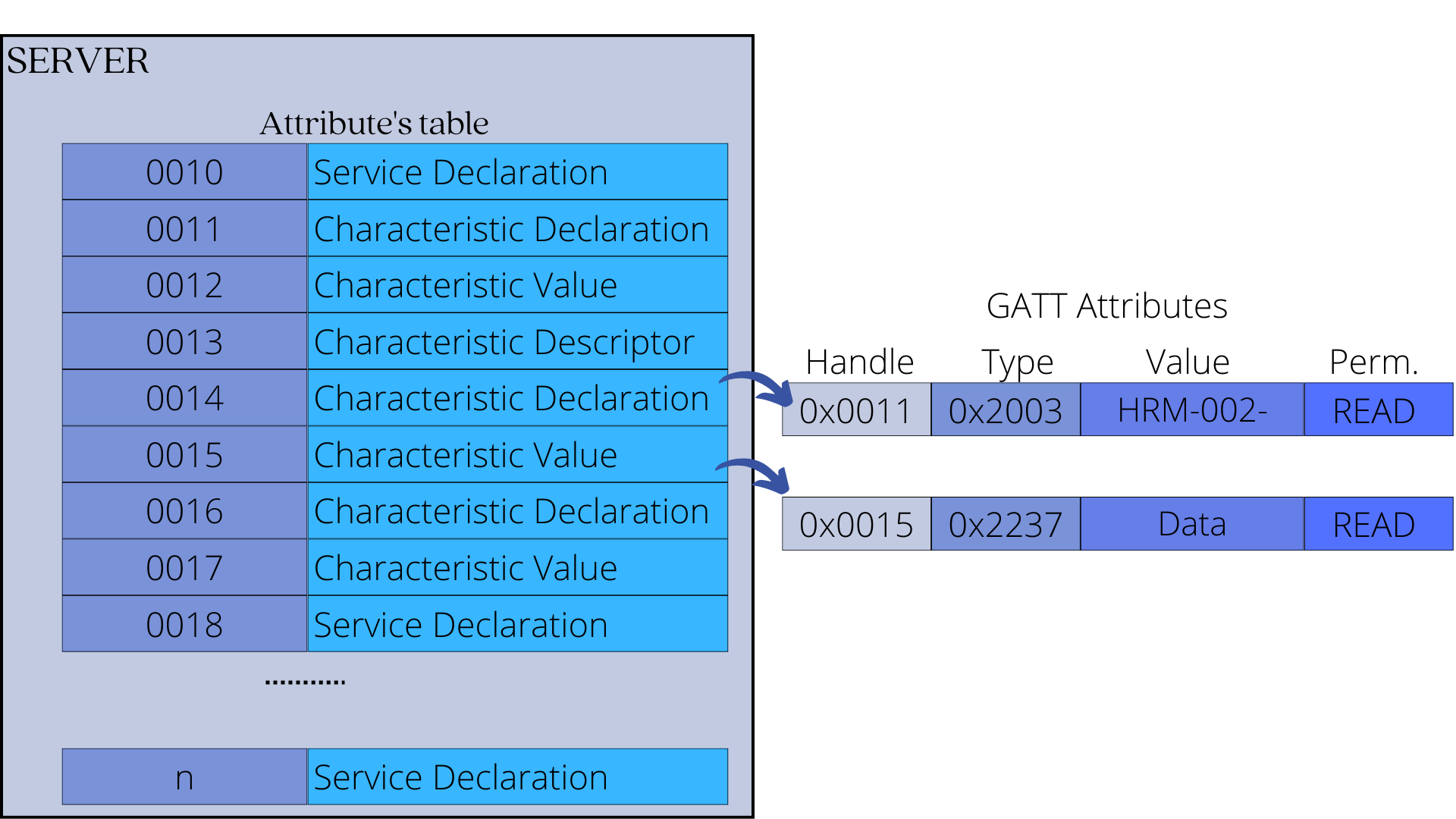
Each service and characteristic, therefore, have a:
- UUID - This is a unique identifier that differentiates it from other services or characteristics, and it is stored in the attribute's type field. For officially adopted Bluetooth LE services and characteristics, the UUID has a length of 16 bits. Custom services have a UUID length of 128 bits.
- Value- This is data or metadata stored in the Attribute value field.
- Permissions- This defines what operations are allowed on the data (read, write, etc.) and security settings. These are stored in the Attribute permissions field.
3. GATT Uses ATT PDUs
The GATT layer uses ATT requests and responses to:
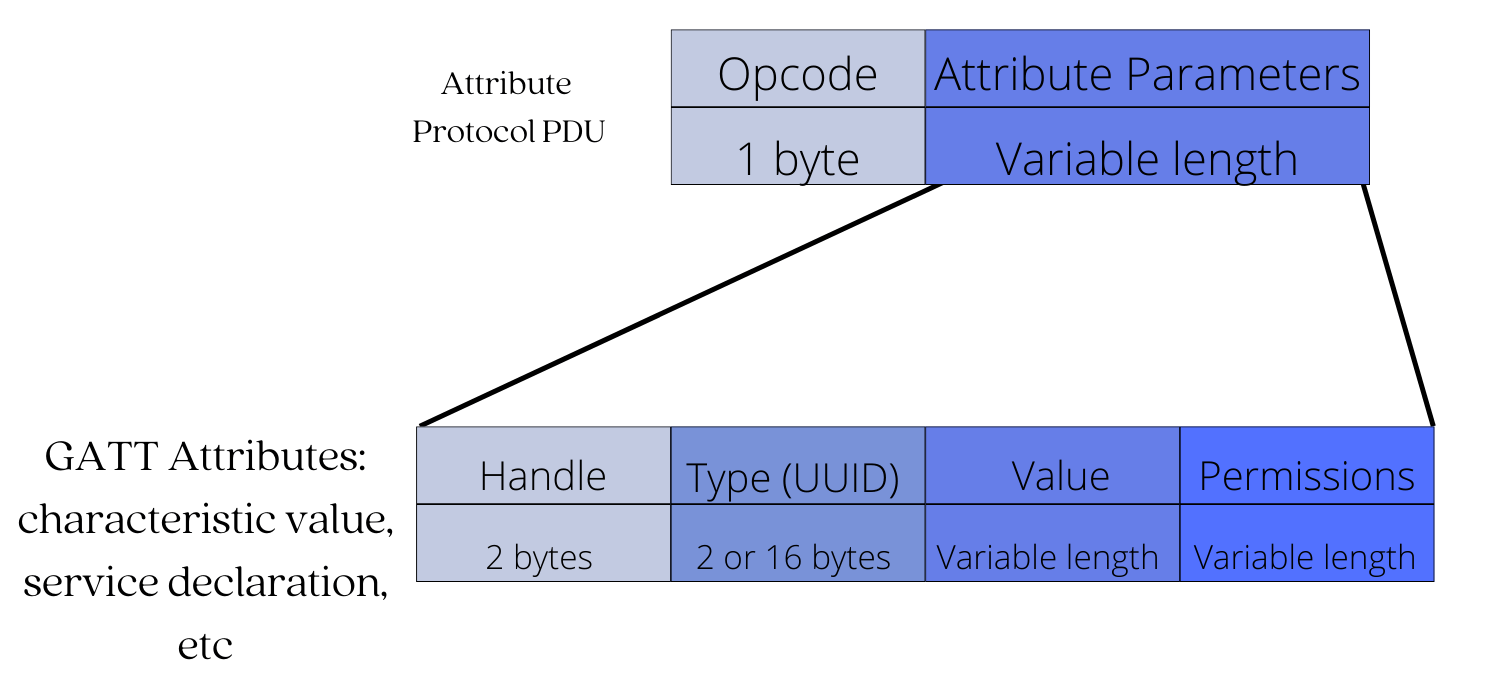
- Read and write data on the GATT server
- Discover all the primary services offered by a GATT server
- Subscribe or unsubscribe to notifications/indications from the GATT server.
Summary
In this post, we took a closer look at the ATT and GATT Protocol layers to help us develop applications that take advantage of connection-oriented communication.
Simply put:
- The ATT protocol is responsible for managing data storage between devices. It provides a means for the server device to store data in a format (Attribute data structure) that the client can read and write, as well as provide mechanisms for the client to access, write, and read that data ( Access methods and permissions).
- The GATT layer defines a hierarchical data structure that aids in demonstrating the (relationship) connections between various types of server-stored data ( GATT Profile)


