


To fully understand advertisements in BLE, we need to take a step back and learn about one of the layers within the architecture of BLE: the Generic Access Profile (GAP).
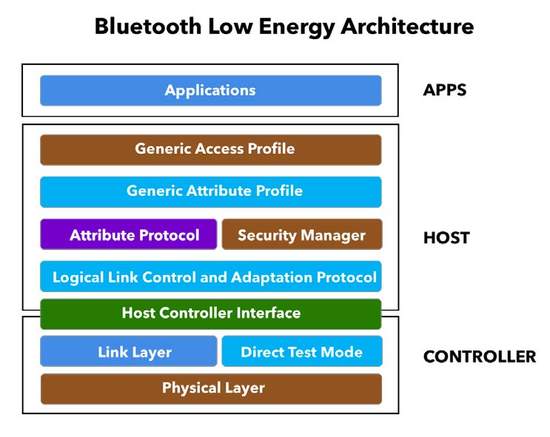
GAP provides a framework that defines how BLE devices interact with each other. This includes:
- Roles of BLE devices
- Advertisements (Broadcasting, Discovery, Advertisement parameters, Advertisement data)
- Connection establishment (initiating connections, accepting connections, Connection parameters)
- Security
There are four main GAP roles that a BLE device operates in:
- Central: a device that discovers BLE peripherals and broadcasters capable of connecting to peripherals.
- Peripheral: a device that advertises its existence with the capability of accepting connections from a central.
- Broadcaster: a device that sends out advertising packets without the capability of accepting connections.
- Observer: a device that discovers peripherals and broadcasters without initiating any connections.
A peripheral or broadcaster always starts with advertising before accepting a connection. In fact, the advertisement packets are the only way that allows a central or scanner to discover a peripheral or broadcaster.
The difference between two BLE devices being in a connected mode versus in an advertising-discovery mode is that the connected mode allows bi-directional data transfer between the two connected devices. An advertising device (peripheral or broadcaster), on the other hand, is not able to receive any data from the observer/central device in that state.
One exception to this is that if an advertiser/broadcaster supports what's called "scan requests", it is able to "respond" to a "scan request" packet that can be sent by the central/observer with a "scan response". This is usually employed in order to transmit additional data in scenarios when you can't fit all your data within the original advertising packet. So I guess in a sense, this could be considered "bi-directional".
Advertisement Channels
In the Advertising state, a device sends out packets containing useful data for others to receive and process.
The packets are sent at a fixed interval defined as the Advertising Interval. There are 40 RF channels in BLE, each separated by 2 MHz (center-to-center), as shown in the following figure.
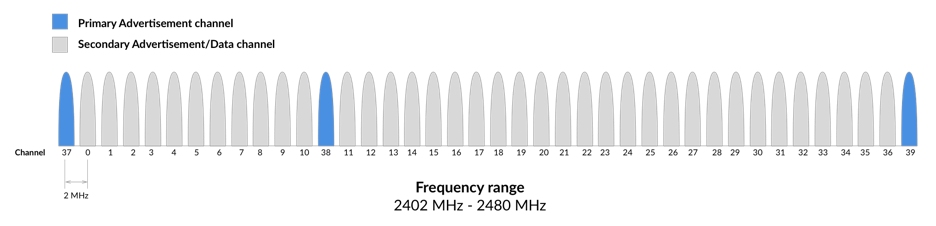
Three of these channels are called the Primary Advertising Channels (labeled 37, 38, and 39), while the remaining 37 channels are called the Secondary Advertisement Channels (they are also the ones used for data transfer during a connection).
Secondary advertising channels are used as "auxiliary" channels meaning that a device has to first advertise on the primary advertising channels before sending out advertising packets on the secondary channels.
If a device wants to utilize the secondary advertising channels, it sends out advertising packets on the primary channels that point to the secondary advertising packets. We'll go over how this exactly works in a later section.
Advertising Packet Format
Let's look at the format of the advertising packets:
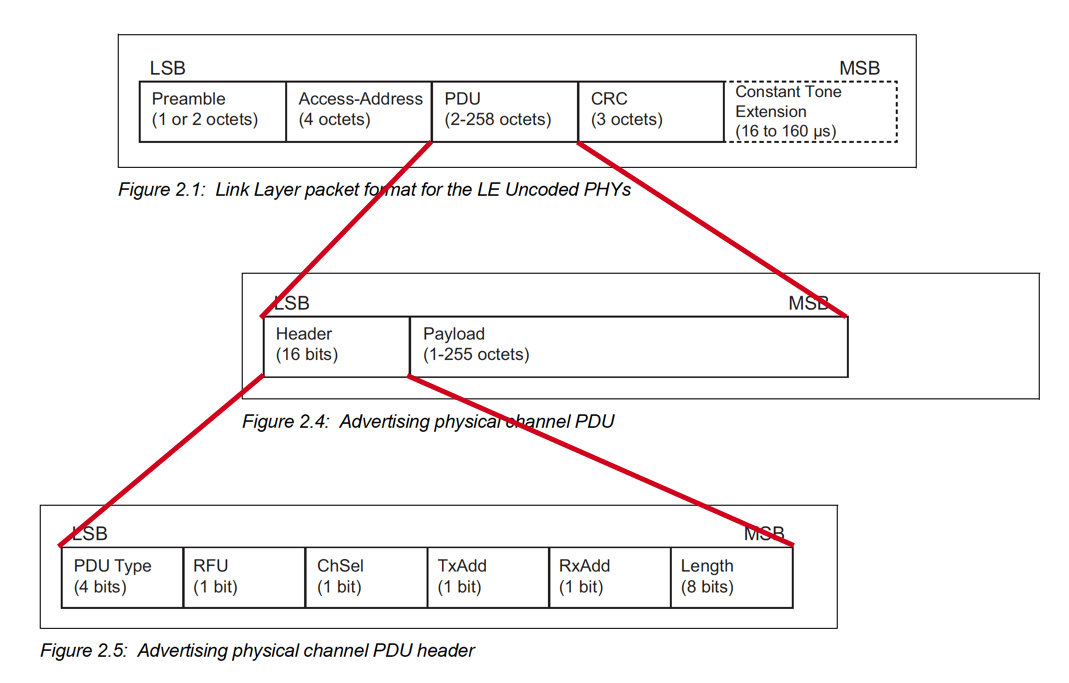
The PDU (Protocol Data Unit) field is what we're interested in. This is the field that changes depending on the type of packet being transmitted (data vs. advertising) and the one that includes the "user-data" that your application is interested in sending out.
Even though the top diagram within the figure is for Uncoded PHY, the PDU is still the same for the Coded PHY case (if you're not familiar with Coded PHY, it is a new PHY that was introduced in Bluetooth version 5.0 and is useful in long-range communication and/or in noisy environments – refer to my post on Long-range Bluetooth communication for more information).
Let's define each of the fields within the PDU:
PDU Header
PDU Type: this field is 4 bits in length and has the following possible values:
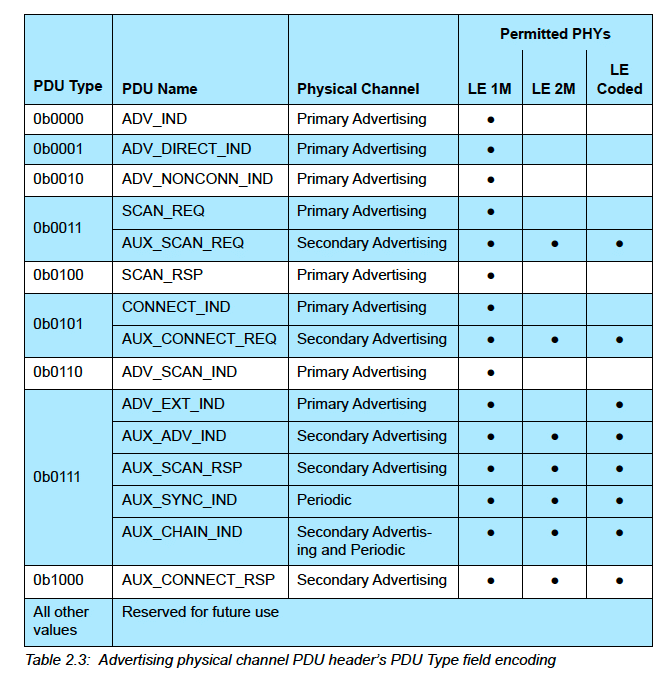
The PDUs are split up into multiple categories depending on the purpose.
Before we list each of the PDUs, let's cover some common terminology:
- Directed vs. Undirected: Directed advertising types accept connection requests from a known peer device, whereas Undirected accept connection requests from any peer device.
- Connectable vs. Non-Connectable: determines whether an advertising device allows a connection to be established or not.
- Scannable vs Non-Scannable: determines whether an advertising device is capable of handling a Scan Request message from an observer or central. Scan Requests and Responses are used to allow devices to advertise more data than can fit into one advertising packet.
- Extended advertising: Extended Advertisements are a way to advertise more (offloaded) data than what’s allowed with Legacy Advertisements. Offloading is accomplished by first advertising on the primary channel that points to an auxiliary packet on the secondary channel.
Note: Since non-Bluetooth 5 devices will not be able to discover extended advertisements, it is recommended that advertisers also use an advertising set with legacy advertising PDUs for older scanning devices to be able to discover the end device. Advertising sets are used to send out different types of advertising events simultaneously. Each advertisement set will have different advertisement parameters such as advertising PDU type, advertising interval, and PHY. - Periodic advertising: Another feature of Bluetooth 5 Extended Advertisements is Periodic Advertisements. These are used for broadcasting packets to devices at a set period between two unconnected devices, meaning that more than one device can listen and tune in on these periodic advertisements. They consist of advertisements sent at a fixed interval with the advertisement data changing from time to time.
Legacy Advertising PDUs
These are available for all Bluetooth versions – also enables backward compatibility with older versions and are used on the Primary advertising channels.
ADV_IND: Connectable Scannable Undirected advertising.ADV_DIRECT_IND: Connectable Directed advertisingADV_NONCONN_IND: Non-Connectable Non-Scannable Undirected advertisingADV_SCAN_IND: Scannable Undirected advertising
Extended Advertising PDUs
These types were introduced in Bluetooth version 5.0. They provide devices the option to advertise on the Secondary advertising channels in addition to the Primary advertising channels. The benefit of the Secondary channels is that they allow increased advertising data capacity.
ADV_EXT_IND: Extended advertising (used for all advertising types except Connectable Scannable Undirected) – sent on the Primary advertising channels.AUX_ADV_IND: Extended advertising (used for all advertising types except Connectable Scannable Undirected) – sent on the Secondary advertising channels.AUX_SYNC_IND: used for Periodic advertisingAUX_CHAIN_IND: used with other advertising types to hold additional advertising data (chaining of advertising packets)
Scanning PDUs
These are used to utilize the Scan Request → Scan Response functionality, which enables devices to broadcast more advertising data than is allowed in a single advertising packet.
SCAN_REQ: used in Scan Request packets sent on the Primary advertising channelsSCAN_RSP: used in Scan Response packets sent on the Primary advertising channelsAUX_SCAN_REQ: used in Scan Request packets sent on the Secondary advertising channelsAUX_SCAN_RSP: used in Scan Response packets sent on the Secondary advertising channels
Initiating PDUs
These are used in establishing a connection between a peripheral device and a central device.
CONNECT_IND: this is the connection request packet sent on one of the Primary advertising channelsAUX_CONNECT_REQ: this is the connection request packet sent on one of the Secondary advertising channelsAUX_CONNECT_RSP: this is the connection response packet sent by the peripheral on one of the Secondary advertising channels
RFU: Reserved for future use
ChSel: this bit will be set to 1 if the advertiser supports the LE Channel Selection Algorithm #2 feature (refer to the Bluetooth Core Specification Vol. 6, Part B, Section 4.5.8.3).
TxAdd: this bit is set to 1 if the advertiser's address is random, and set to 0 if the address is public
RxAdd: this bit is set to 1 if the target device's address is random, and set to 0 if the address is public
Length: holds the Length of the payload of the packet.
PDU Payload
The content of the payload of the advertising packet and its maximum size are dependent on the PDU type used. The advertising data includes the information the advertiser wants to relay to the observer/central device.
Here we're mostly interested in the PDU types that contain advertising data. Those PDUs are:
- Legacy advertising PDUs including:
ADV_IND,ADV_NONCONN_IND,ADV_SCAN_IND - Extended advertising PDUs including:
ADV_EXT_IND,AUX_ADV_IND,AUX_SYNC_IND,AUX_CHAIN_IND
Advertising Data
There are a number of standard data types that can be included in the advertising data. The data is formatted as follows:
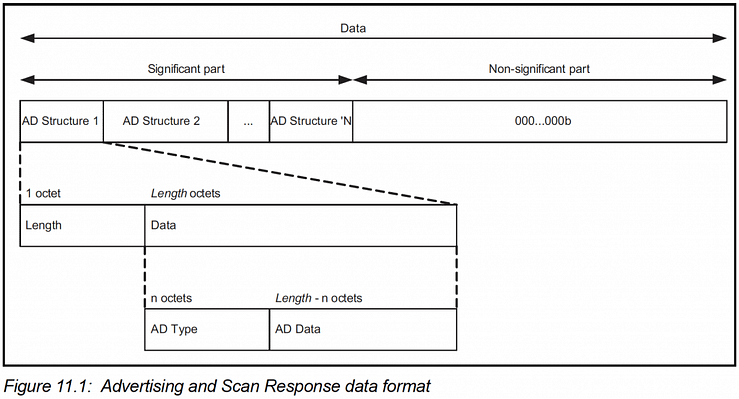
These are defined in a specification document that's separate from the Core Specification document called the Core Specification Supplement (https://www.bluetooth.com/specifications/bluetooth-core-specification/).
The different BLE advertising data types are:
- Service UUID: used to include a list of Service UUIDs
- Local Name: the device name (either Shortened or Complete)
- Flags: one-bit flags that are included when an advertising packet is connectable. The flags are: LE Limited Discoverable Mode, LE General Discoverable Mode, BR/EDR Not Supported, Simultaneous LE and BR/EDR to Same Device Capable (Controller), Simultaneous LE and BR/EDR to Same Device Capable (Host).
- Manufacturer Specific Data: used to include custom data identified by a company identifier.
- TX Power Level: transmit power level
- Slave Connection Interval Range: a way to communicate the Peripheral's preferred connection interval range in advertising packets.
- Service Solicitation: used to "invite" centrals that expose one or more of the specified Services to connect.
- Service Data: includes a Service UUID and the data associated with the service.
- Appearance: defines the "type" of the advertising device per the standard Appearance assigned numbers.
- Public Target Address: defines the address of one or more intended recipients of an advertisement when one or more devices were bonded using a public address.
- Random Target Address: defines the address of one or more intended recipients of an advertisement when one or more devices were bonded using a random address.
- Advertising Interval: self-explanatory.
- Uniform Resource Identifier: used to broadcast a URI such as a URL.
- LE Supported Features: defines the LE-specific features supported by the device. These are defined in the Core Specification (Vol. 6, Part B, Section 4.6).
Ok, that's it for this week's post. We'll be covering more in Part 2 of this series, including:
- Examples of advertising packets
- How to use advertising packets efficiently
- Extended advertising packets
- Advertising parameters
- and more...


