


In this week's post, we'll continue our discussion on Bluetooth Advertisements (first part here) and cover them in a bit more detail.
Bluetooth Advertisements are crucial for any BLE device since they are utilized for all types of applications, whether that's a device that allows connections or one that simply advertises its presence and includes data for others to discover.
In order to utilize advertising packets efficiently, we need to understand the way they get used, the different capabilities they provide, the format of the packets, and how much data they can hold.
The most important goal of advertising packets is to convey information to other BLE devices via the advertising packet type and the advertising data types included in the packet.
The best way to better understand the concept is by going through a few examples of advertisement packets, so let's do that next.
Broadcasting Devices
If you're looking to design a device with the main role of advertising its presence and possibly broadcast some data for other BLE devices (observers, centrals) to discover, then you can implement the Broadcast role.
One example would be a beacon device.
Going back to the different advertising packet types, here are the ones we can use for implementing this role:
- Legacy Advertisements (supported by all Bluetooth versions):
ADV_NONCONN_IND: Non-Connectable Non-Scannable Undirected advertising.
- Extended Advertisements (requires Bluetooth version 5.0 or later):
ADV_EXT_IND: Extended advertising (used for all advertising types except Connectable Scannable Undirected) – sent on the Primary advertising channels.AUX_ADV_IND: Extended advertising (used for all advertising types except Connectable Scannable Undirected) – sent on the Secondary advertising channels.
Let's revisit the packet format of advertising packets:
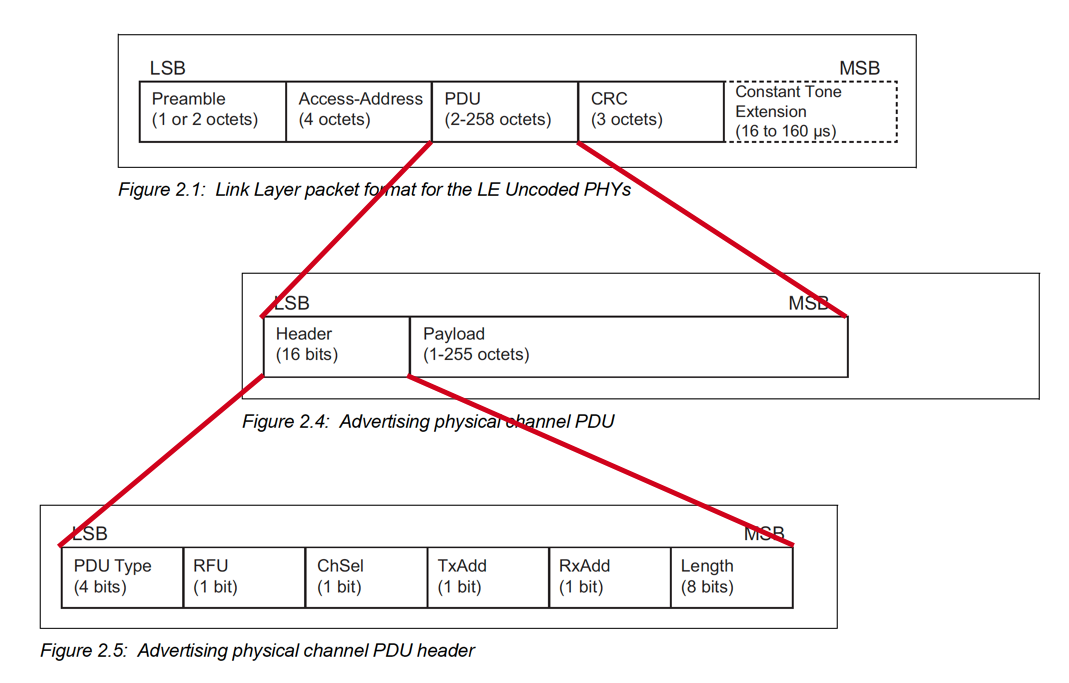
PDU Payload format:
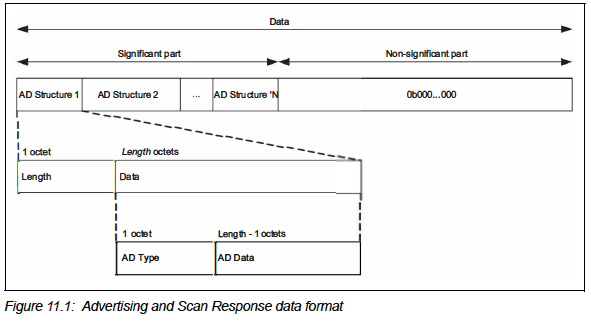
Depending on the platform and Bluetooth stack used on your device, the APIs will differ, but in general, you'll need to define the following:
PDU Content
- PDU Header
PDU Type:ADV_NONCONN_IND(0b100)
Length: the size of the advertising data - PDU Payload
Flags AD: they are optional in the case of non-connectable advertising packets, so you can skip this field.
Manufacturer Specific Data: <Add your own custom data that you want the device to broadcast> (e.g., sensor data)
Device Name: depending on how much data is used up by the previous fields, you may be able to fit a device name string into the advertising packet payload.
Another option is to include the device name in a Scan Response packet.
In the case of a Legacy Advertising Packet, the advertising data portion has a maximum size of 31 bytes (with at least 2 bytes used up by the Length and Type fields in the case of one advertising data type included, leaving a max of 29 bytes for the payload).
Also, keep in mind that the Manufacturer Specific Data field will include 2 bytes containing the Company Identifier Code, which is followed by the user data. Company Identifier Codes can be obtained from the Bluetooth SIG for free (as long as the company is a Bluetooth SIG member company). Learn more here: https://www.bluetooth.com/specifications/assigned-numbers/company-identifiers/
If you choose to implement a Scan Response, you could include a second advertising packet to send additional advertising data that does not fit into the main advertising packet.
This relies on the Observer/Central sending a Scan Request packet to the advertising device, to which the advertiser responds with a Scan Response packet. The format of the Scan Response packet is exactly the same as the Advertising packet.
Let's take a look at an example of a device that simply advertises its Complete Local Name.
The PDU Payload would look something like this:
| Value | Notes |
|---|---|
0x0B | Length of the data |
0x09 | <<Complete local name>> |
0x4e | 'N' |
0x6f | 'o' |
0x76 | 'v' |
0x65 | 'e' |
0x6c | 'l' |
0x20 | ' ' (space) |
0x42 | 'B' |
0x69 | 'i' |
0x74 | 't' |
0x73 | 's' |
Advertising PDU Payload data
To learn more about the different advertising data types, refer to the Supplement to Bluetooth Core Specification document: https://www.bluetooth.com/specifications/bluetooth-core-specification/
Connectable Devices
If you're looking to design a device that primarily allows connections from another BLE device and operates mostly in connection mode, then here are a few things to keep in mind:
- You are required to include the Flags AD field. In this case, you'd want to enable the <<BR/EDR Not Supported>> bit.
- For Legacy Advertisements, use the
ADV_INDadvertisement type. - For Extended Advertisements (such as in the case of Coded PHY advertising which requires the use of Extended Advertisements), use the
ADV_EXT_INDadvertisement type on the primary advertising channels andAUX_ADV_INDon the secondary advertising channels.
Note: Some SDKs will usually abstract this for the developer, and they'll provide a single API parameter that configures the appropriate advertisement types for both the primary and secondary channels. However, you will probably still need to define the PHY used for each of the channel types.
One important thing to keep in mind is that Extended Advertisements are not supported by all scanners. So, if you're looking to implement a connectable device that can be connected to from both legacy devices and ones that support scanning for extended advertisements, it's highly recommended to configure your device to advertise using Legacy and Extended advertisements.
LE Limited Discoverable Mode vs. General Discoverable Mode
As part of the Flags AD field included in the advertisement data, there are two flags we haven't discussed yet:
- Limited Discoverable mode
- General Discoverable mode
Limited Discoverable mode devices are discoverable for a limited period of time and this mode is typically triggered on a device by user interaction.
Note that Limited Discoverable Mode is only allowed to be set in advertisements sent by devices operating in the peripheral role. Scanning devices need to perform what's called a limited discovery procedure in order to discover devices in this mode.
Per the Bluetooth specification, there are two common reasons to use limited discoverable mode:
– Limited discoverable mode can be used to allow remote devices using the general discovery procedure to prioritize or otherwise identify devices in limited discoverable mode when presenting discovered devices to the end user because, typically, the user is interacting with them.
– Limited discoverable mode can also be used to allow remote devices using the limited discovery procedure to filter out devices using the general discoverable mode.
Core Bluetooth Specification document
On the other hand, devices operating in the General Discoverable mode are discoverable for an indefinite period of time by devices performing the general discovery procedure.
Similar to the limited discoverable mode, this mode is also only supported by devices operating in the peripheral role (devices that allow connections). Scanning devices need to perform what's called a general discovery procedure in order to discover devices in this mode.
Advertising Parameters
In addition to the advertising data, there are a few key parameters that define the behavior of an advertising device. For simplicity, we will focus on Legacy Advertisements which are the most popular.
These parameters are:
- Advertising Interval: this value ranges from 20 ms - 10.24 seconds (in 0.625 ms increment values (meaning that the valid values are 20 ms, 20.625 ms, 21.25 ms, etc.).
- Advertising Channels used: a device can only advertise on a subset of the three primary advertising channels.
- Advertising Timeout: this parameter determines how long the device continues advertising before stopping/turning off the radio.
Each of these parameters has to be configured carefully in order to achieve the best user experience for your device.
For example, here are some notes/tips to keep in mind:
- The shorter the advertising interval, the more power is consumed by the device since the radio has to wake up more frequently to send out advertisement packets.
- Shorter advertising intervals come with the advantage that discoveries and hence connections are faster. So, one has to strike a balance between a short enough advertising interval to satisfy a good enough discovery and connection speed while still achieving the desired power consumption level.
- If customizable via the SDK in use, advertising on all three primary channels (37, 38, and 39) is the safest route to get your device discovered and connected to by another BLE device (since the scanning device will usually have to switch between the three advertising channels during the scanning process).
- In general, you do not want your device to advertise indefinitely, so make sure that a reasonable advertising timeout value is set. You could also trigger advertising via a timer that expires every so often or via user interaction (e.g., click of a button on the device).
- If you are developing a peripheral or broadcaster device that users will interact with via an iOS device, then make sure to check out the guidelines recommended by Apple in section 35 of the following guide: https://developer.apple.com/accessories/Accessory-Design-Guidelines.pdf.
Summary
In this post, we covered advertisements in a bit more detail. We went over:
- Advertisements used in broadcasters (devices that do not allow connections)
- Advertisements used in peripherals (devices that allow connections)
- Advertising Parameters
In the next post within the series, we'll take a deeper look into:
- The timing of advertisements
- The scanning parameters used on a scanning device
- How to optimize them to reliably discover your peripheral or broadcaster device
- How to develop a BLE scanner to discover broadcasters and peripherals


