


In BLE, there are many events and operations that can be exchanged between a Peripheral and a Central. Understanding these events is imperative for any BLE developer, and there are two aspects to achieving this:
- Learn the concepts in theory.
- Learn by analyzing them using Bluetooth analyzer (sniffer) captures.
I believe these two methods go hand in hand in helping achieve a full understanding of BLE.
We cover the first aspect in my Intro to Bluetooth Low Energy book (which you can download for free here or purchase in paperback format).
In this post, we will go through a number of events and better understand them by analyzing captures from a Bluetooth sniffer (Ellisys Bluetooth Tracker).
Here’s a list of events/operations we’ll be looking at:
- Advertisements:
- Types: Connectable Scannable Undirected & Nonconnectable Scannable Undirected
- Advertisement Interval
- RF channels used
- PHY used
- Advertisement data fields
- Bluetooth Address and type
- Connection requests
- Post-connection operations:
- Version Exchange message
- Feature Exchange message
- Exchange MTU
- Attribute discovery including GATT Services, Characteristics, Descriptors, and others.
Advertisements
In this section, we’ll take a look at a couple of different advertisement packet types including:
- Nonconnectable scannable undirected advertisements: this type is used most commonly in Beacon applications where a device broadcasts data to be discovered by multiple other BLE devices, and does not accept connections.
- Connectable scannable undirected advertisements: this type is used most commonly by a device that wants to accept connections from other BLE devices that discover the advertisements.
For each of these types, we’ll look at:
- The different advertisement data fields
- RF Channel used
- PHY used
- Bluetooth Address & Type
Before we get into specific examples, let’s first look at the format of an Uncoded (1M PHY, 2M PHY) Advertisement packet (figure taken from the Bluetooth 5.1 specification document):
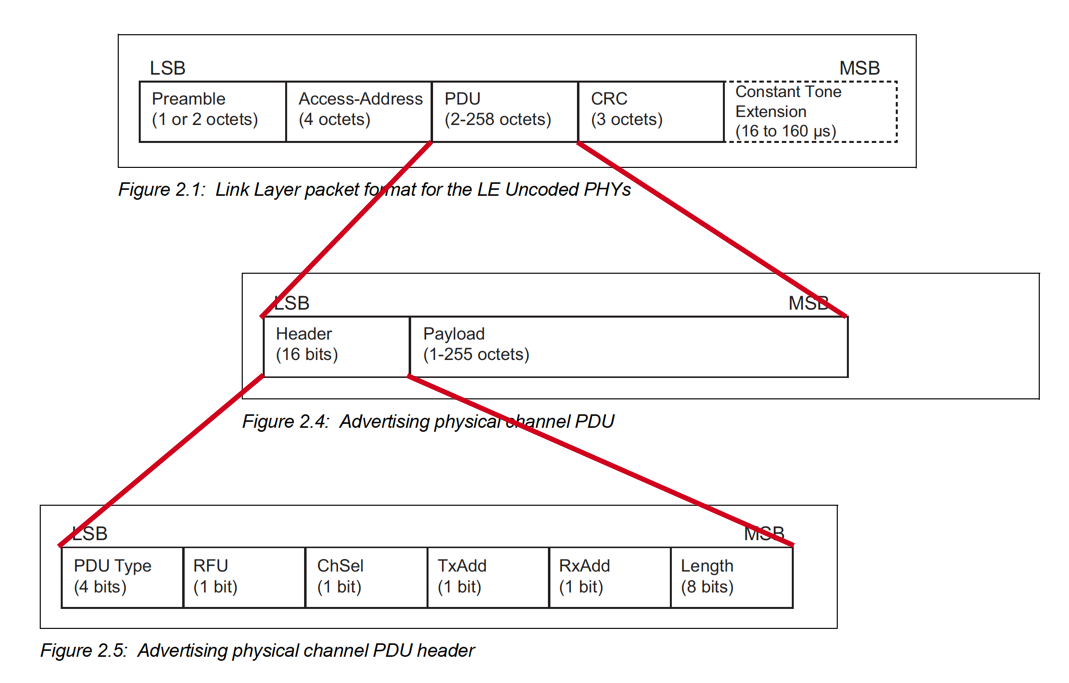
You’ll notice that there are two main parts in the PDU: Header and Payload.
The Header is standard for all advertisement packets, and the Payload depends on the advertisement type (PDU).
Nonconnectable Scannable Undirected Advertisements
Let’s take a look at a nonconnectable scannable advertisement from a BLE sniffer capture:

Here are the details as shown by the sniffer software. The first screen capture shows the details of the Link Layer information:
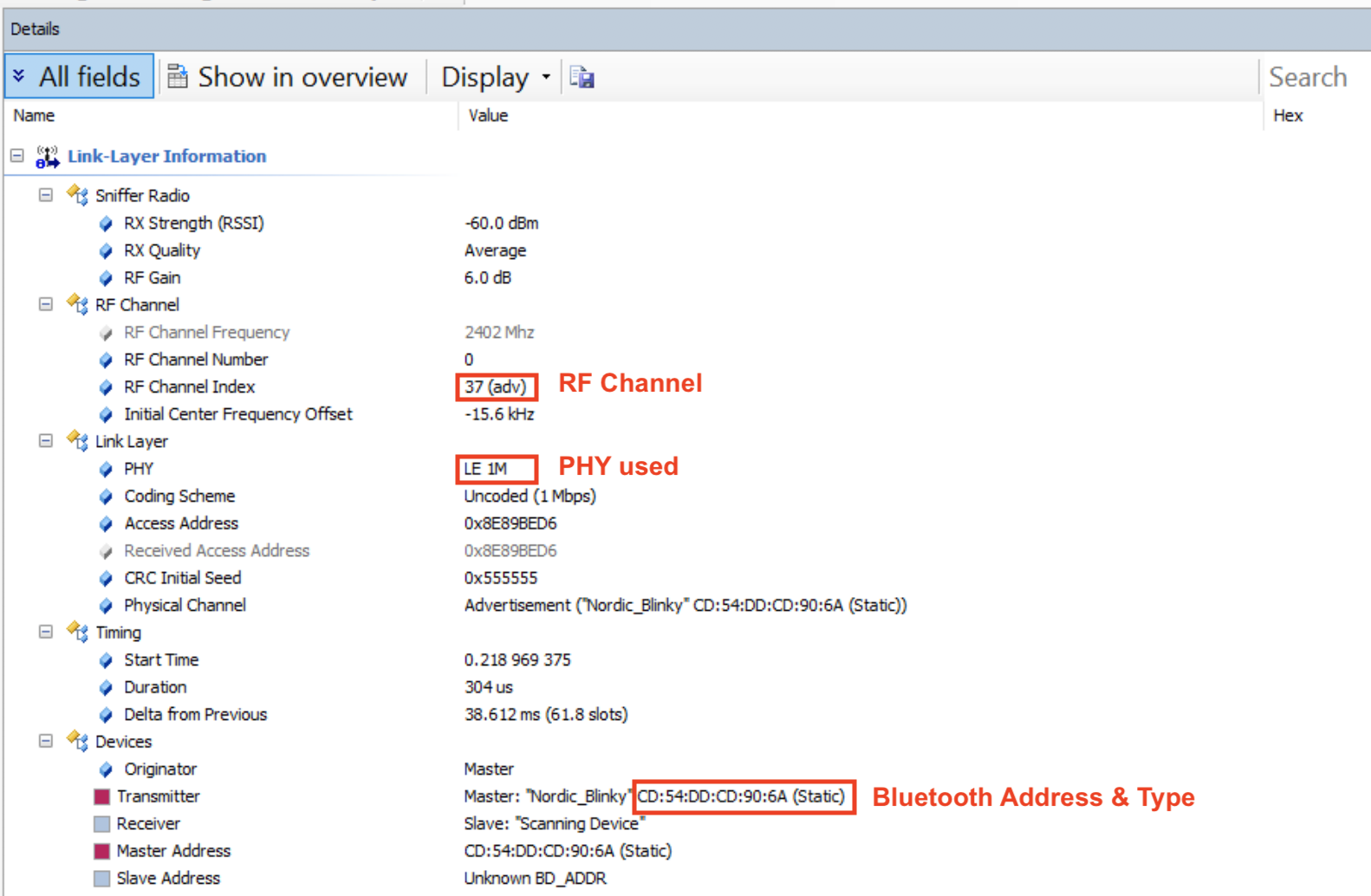
A few notes about the above fields:
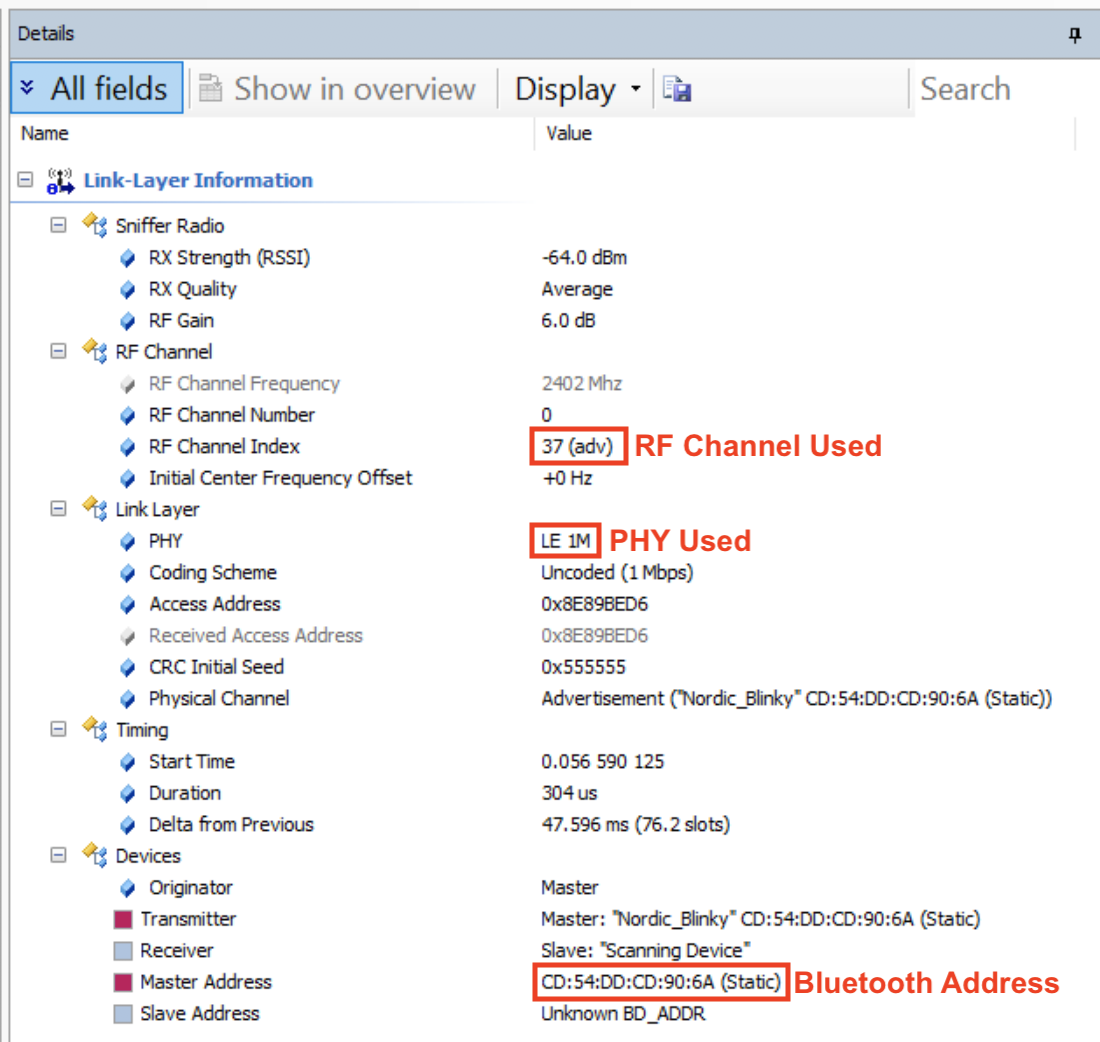
- The RF Channel this selected packet was sent on is channel 37 (which is a primary advertisement channel)
- The PHY used is the 1M PHY (Uncoded)
- The Bluetooth Address is CD:54:DD:CD:90:6A and it’s a Static Address.
The remaining details show the contents of the Link Layer packet itself. I’ve gone ahead and highlighted the most important fields:
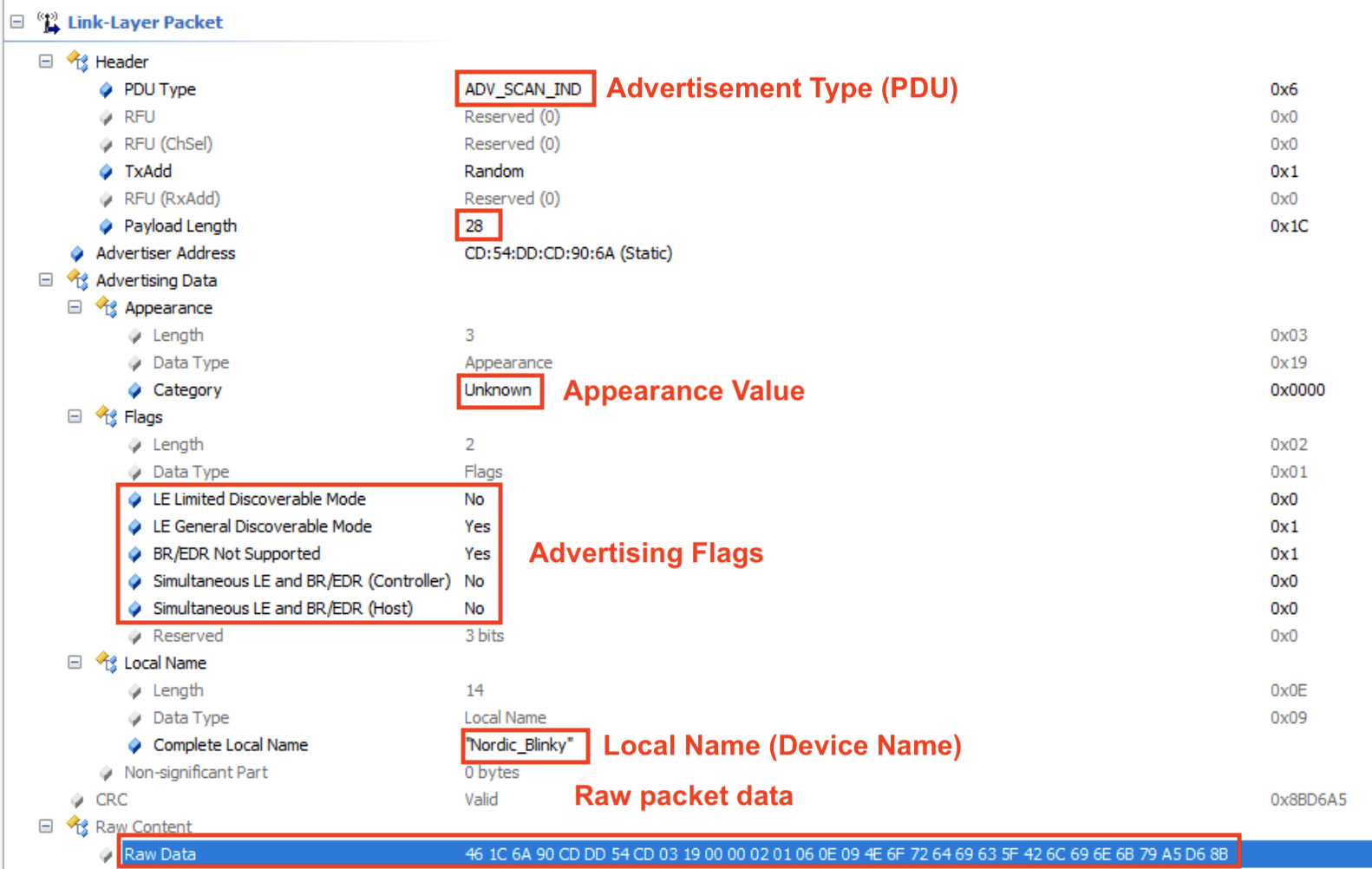
A few notes about the fields in the capture:
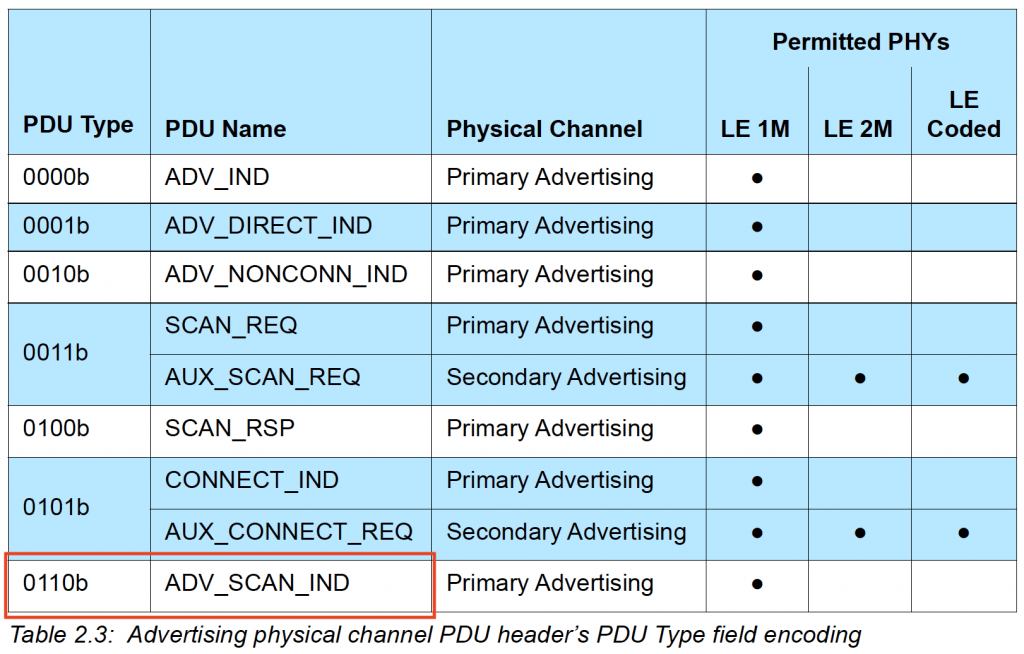
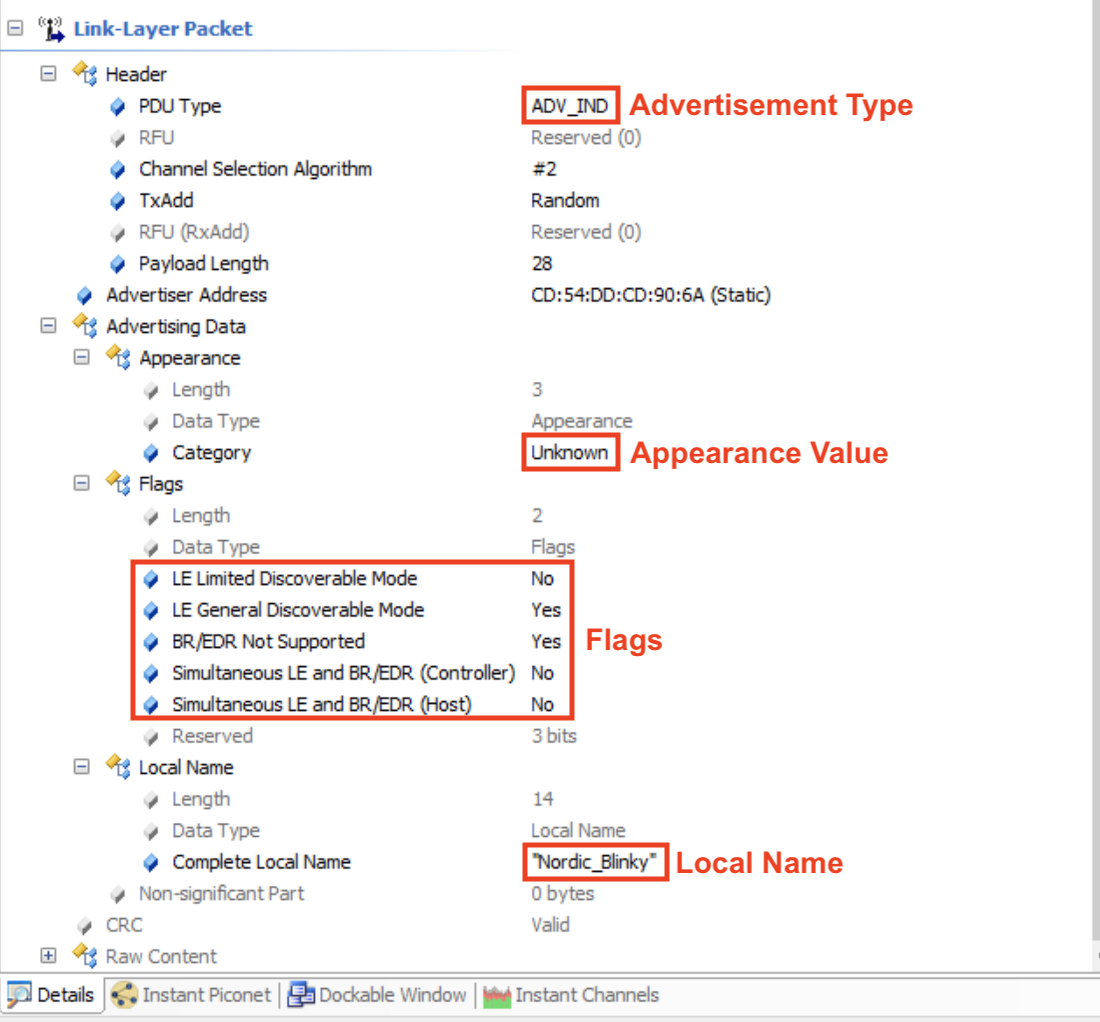
Advertisement type (PDU): ADV_SCAN_IND. This refers to the nonconnectable scannable undirected advertisement type. The value in Hex is shown to the right: 0x6 and is defined in the official specification:
Payload length is 28 (bytes).
Appearance value is Unknown (0x0000).
Advertising Flags:
LE Limited Discoverable Mode: No
LE General Discoverable Mode: Yes
Simultaneous LE and BR/EDR (Controller): No
Simultaneous LE and BR/EDR (Host): No
Device name (Local Name): “Nordic_Blinky“
Raw Data:

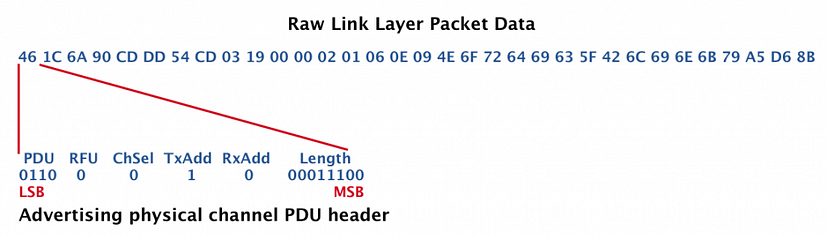
Let’s take a look at how the raw data maps to the values listed in the Details screenshot.
Advertising physical channel PDU header:
Payload
The payload for an ADV_SCAN_IND packet is defined in the specification as:
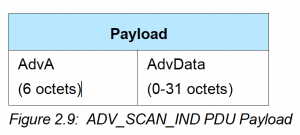
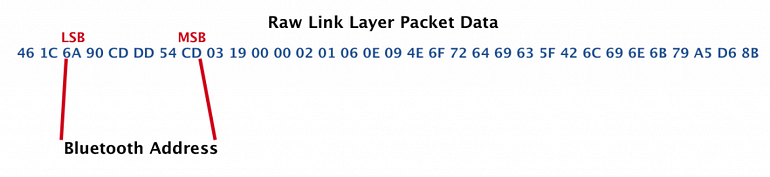
So, we have the AdvA (Bluetooth Address of the advertising device) and the advertising data:
Bluetooth Address: CD:54:DD:CD:90:6A
AdvData (Advertisement Data):
The advertising data takes the following format (from the Bluetooth specification):
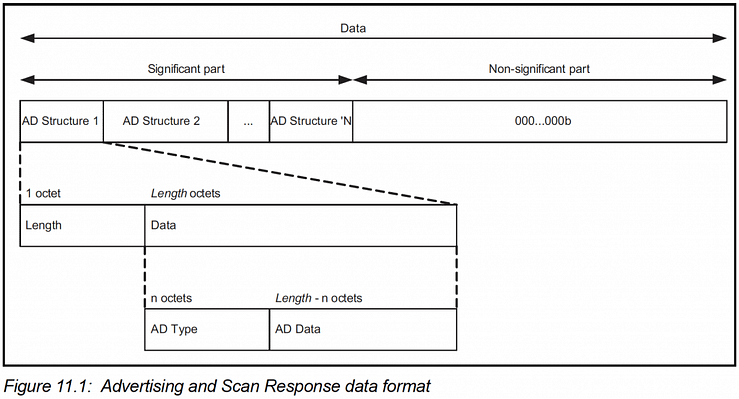
This follows the well-known LTV (length-type-value) format. In our example, we have the following fields:

Now, let’s look at what each of these fields represents.
To do this, we need to refer to:
- The Advertising Data Type (AD Type) listing at https://www.bluetooth.com/specifications/assigned-numbers/generic-access-profile/
- The “Bluetooth Core Specification Supplement (CSS)“ https://www.bluetooth.com/specifications/bluetooth-core-specification/
From these references, we can now analyze the fields:
03 19 00 00:
03 is the Length.
This field has type = 0x19 which represents «Appearance».
It has a value of 0x00 0x00 which maps to “Unknown”.
02 01 06:
02 is the Length.
This field has type = 0x01 which represents «Flags».
Flags are defined as following (from the CSS document):
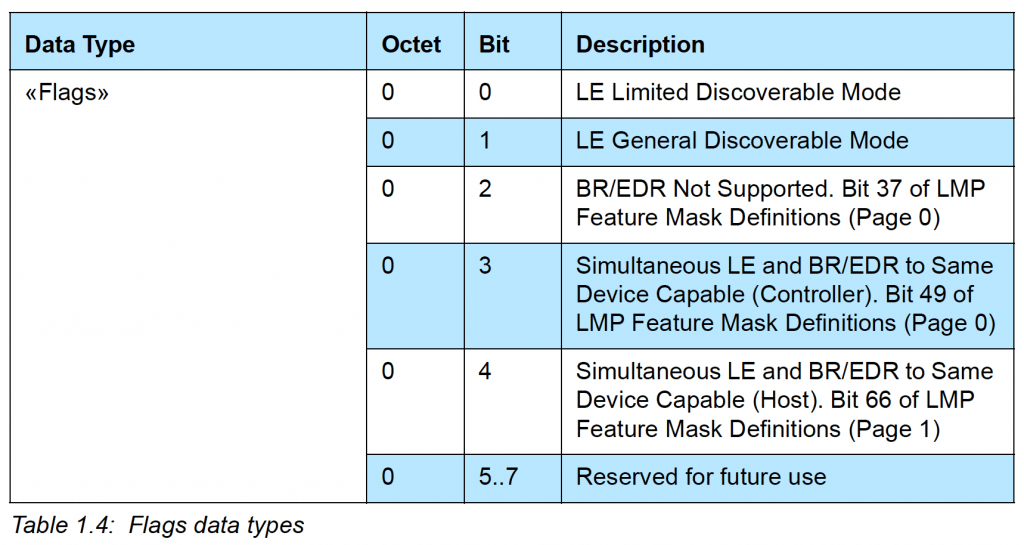
In our example, the Flags field has a value of 0x06 (or 00000110 binary) which means:
Bit 1 is set –> LE General Discoverable Mode is enabled
Bit 2 is set –> Br/EDR Not Support is enabled
0E 09 4E 6F 72 64 69 63 5F 42 6C 69 6E 6B 79:
This field has type = 0x09 which represents «Complete Local Name» or what’s known as the Device Name. It has a value of 4E 6F 72 64 69 63 5F 42 6C 69 6E 6B 79 (in Hex), which maps to “Nordic_Blinky” in ASCII.
The last bytes are the CRC of the Payload:

Connectable Scannable Undirected Advertisements
Now, let’s look at another type of advertisement packet: a connectable scannable undirected advertisement. We won’t go into the details as we did for the previous advertisement type example.
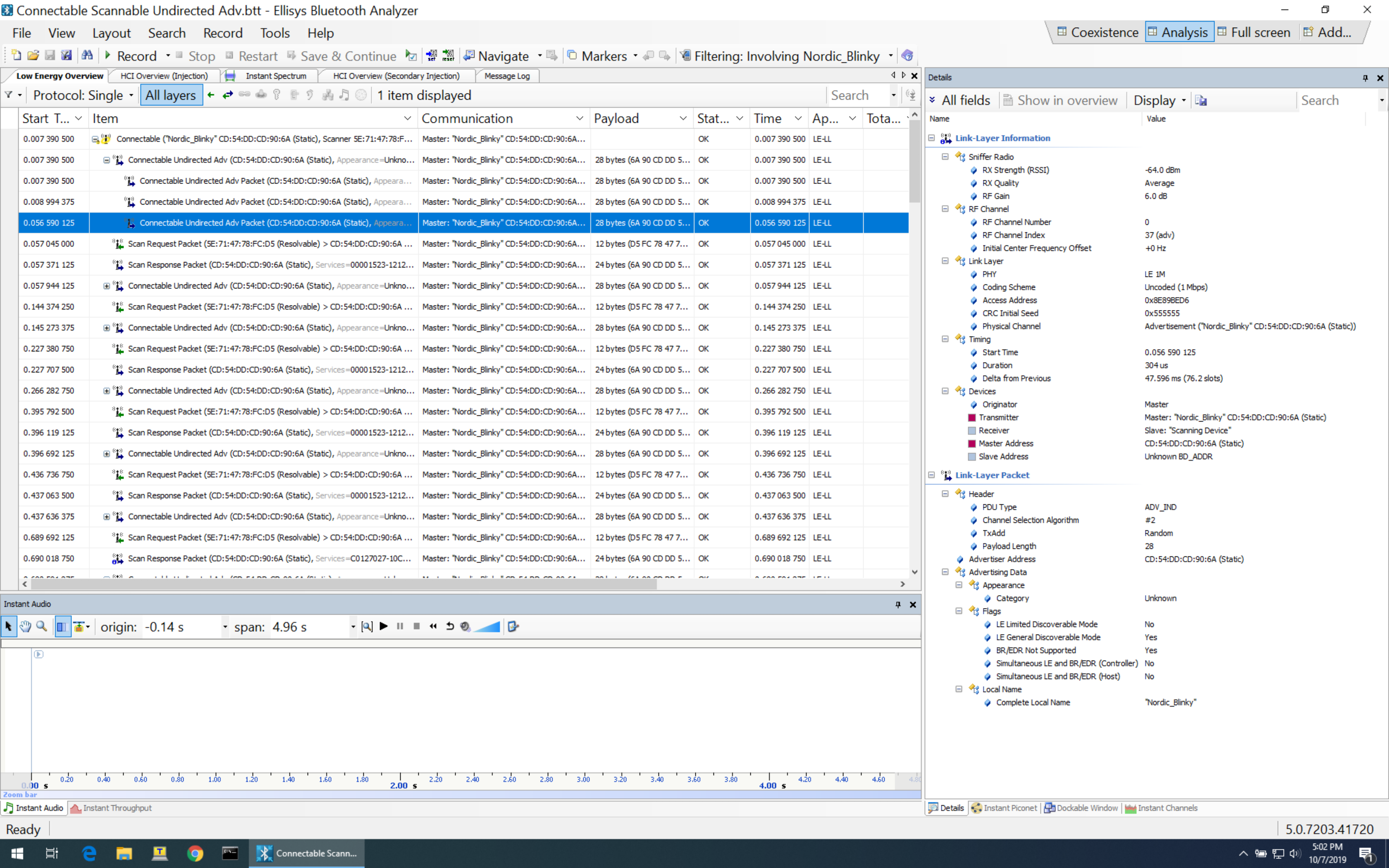
In this example, we notice a lot of similarities to the previous example. All we changed is the type of advertisement.
Here are the details of the selected packet:
Connection Requests
One of the most important packets in BLE is the Connection Request packet. It’s the packet that the Central sends to an advertising Peripheral (sending a connectable advertising packet) to initiate a connection.
This packet type is very important because of the crucial information it contains (which the Central needs to convey to the Peripheral).
Let’s take a look at the contents of a connection request packet (taken from the official Bluetooth specification document):
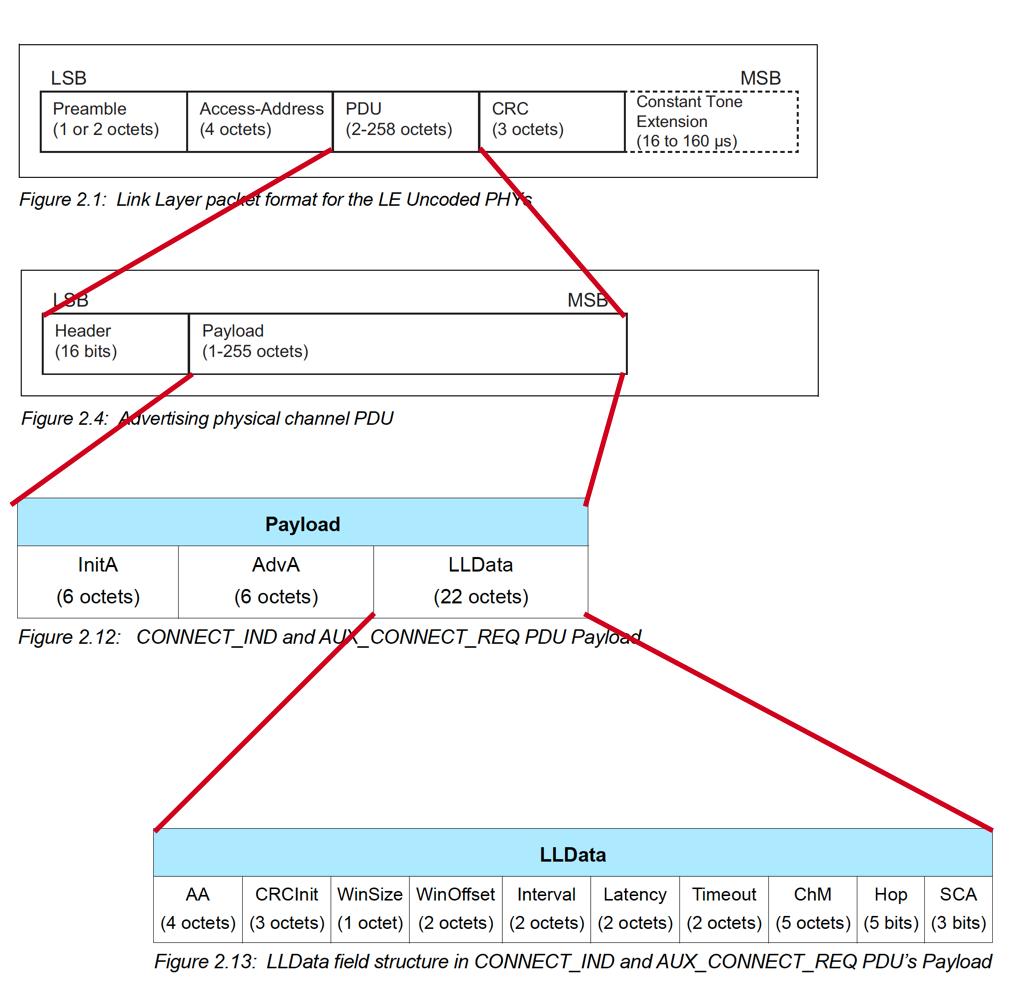
The important information is contained in the LLData part of the packet:
- AA: Access Address
- CRCInit: contains the initialization for the CRC calculation.
- WinSize & WinOffset: both used to set the transmitWindowSize (WinSize * 1.25 ms) and the transmitWindowOffset (WinOffset * 1.25 ms) which allow the Central some flexibility in the timing of transmitting the first connection event anchor point.
- Interval: used to calculate the connectionInterval (Interval * 1.25 ms) which is the frequency at which the Central and Peripheral exchange data.
- Latency: used to set the connSlaveLatency (= Latency) which allows the Slave/Peripheral to skip a number of connection events to conserve power and stay at sleep longer:
- connSlaveLatency=0 –> the Slave is not allowed to skip any connection events.
- connSlaveLatency=n –> the Slave is allowed to skip n connection events.
- Timeout: used to set the connSupervisionTimeout (Timeout * 10 ms) value.
- ChM: contains the channel map indicating which RF data channels are used for data transmission. The LSB represents data channel index 0 and the bit in position 36 represents data channel index 36. A bit of 0 indicates unused and 1 indicates used.
Note: recall that RF data channels are channels 0-36. - Hop: used to set the hopIncrement value (a random value in the range of 5-16).
- SCA: used to set the masterSCA value which is used to determine the worst-case Master's sleep clock accuracy.
Sample Connection Request Packet (Sniffer Capture)
Here’s an example of a connection request packet as captured by the Ellisys Bluetooth Tracker sniffer:
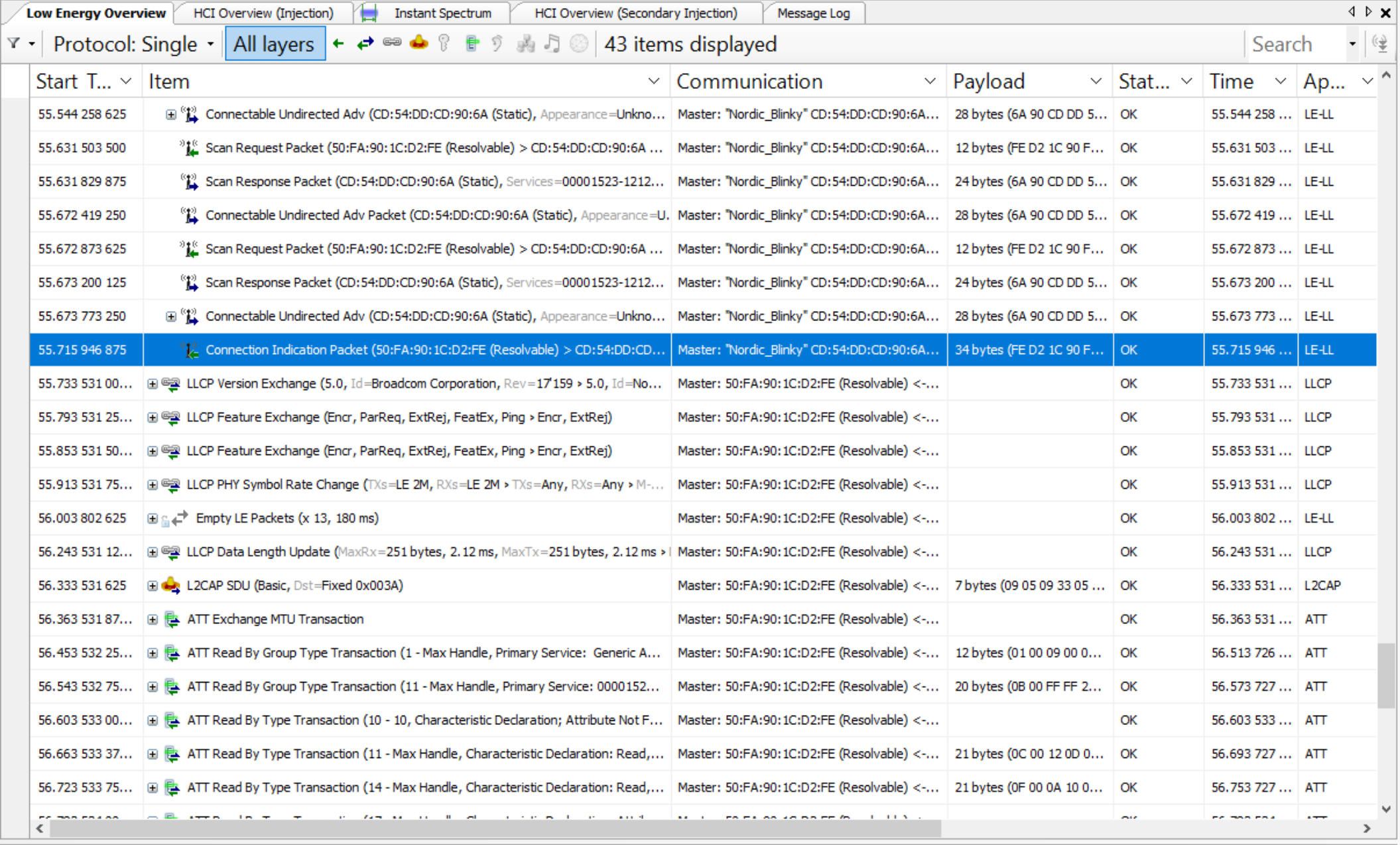
And here are the details of the packet:
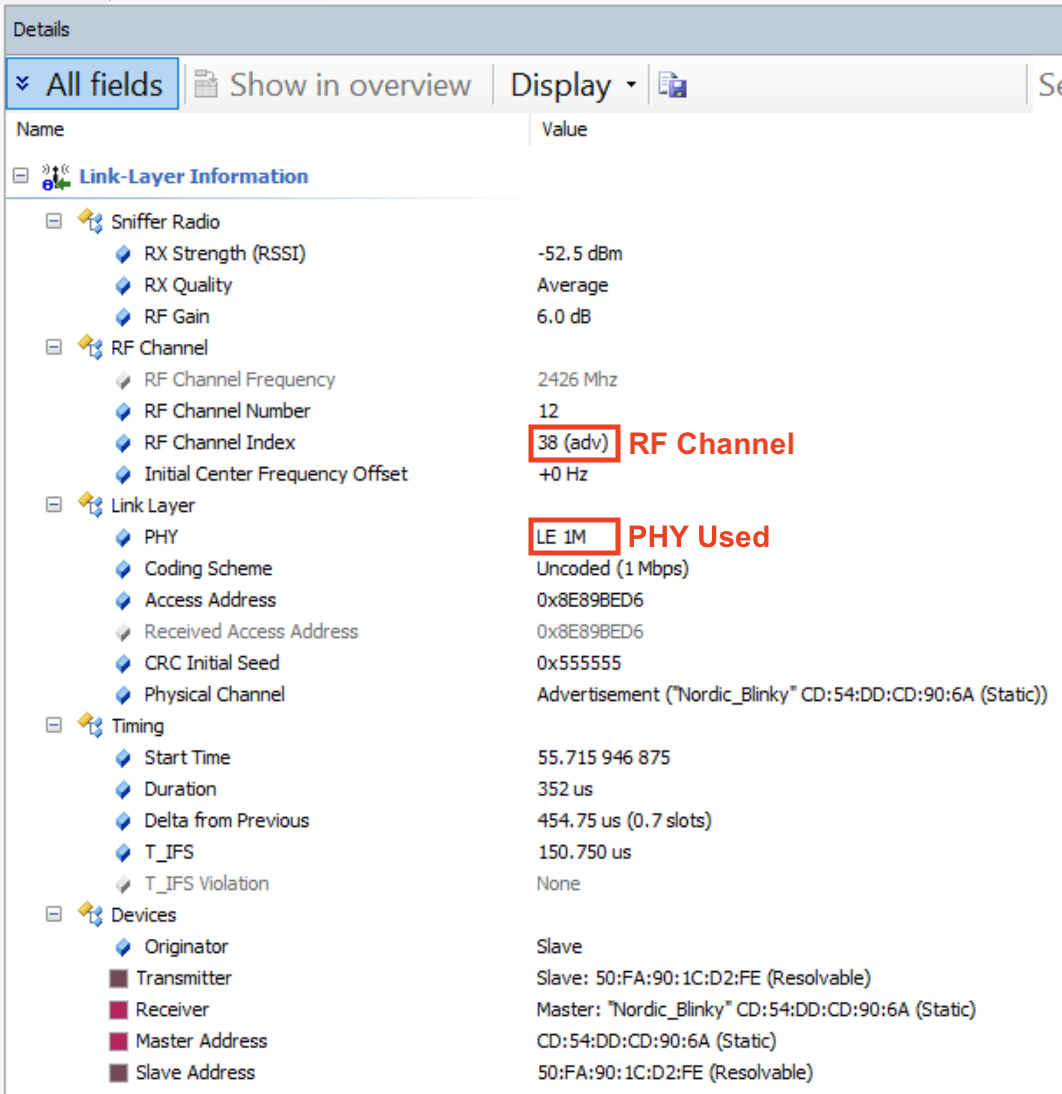
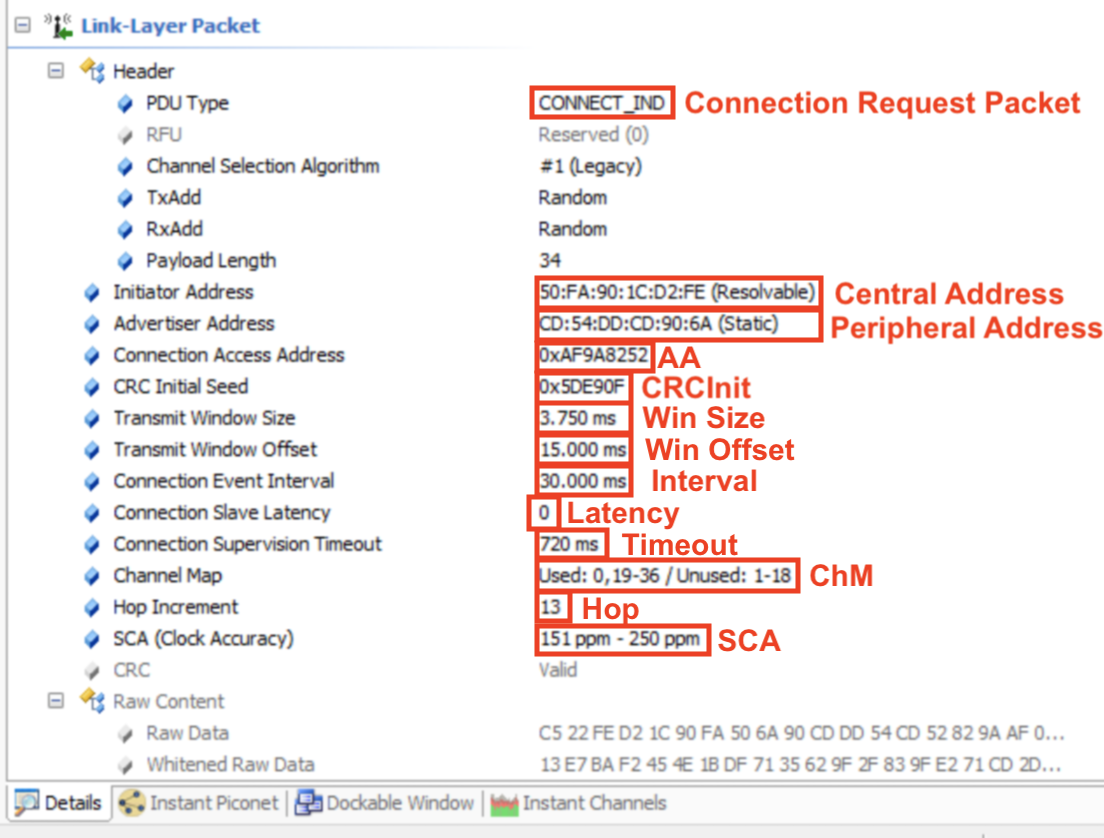
Let’s look at the raw data and see how it maps to these details:

Now, let’s look at the LLData fields:
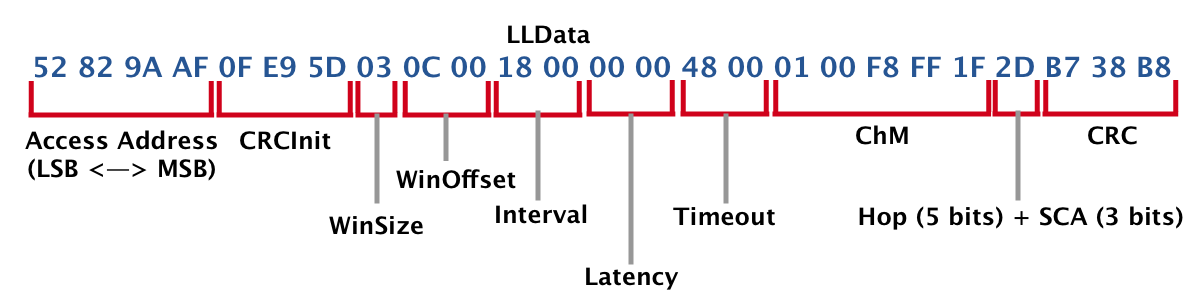
Keep in mind that the data displayed here is LSB to MSB (as it is received at the receiver, from left to right).
That’s it. Now you know about every single bit in a connection request packet!
Post-Connection Requests and Operations
Once two BLE devices are connected, they go through a few operations and data packet exchanges that are necessary before any user-initiated data is exchanged between the two.
Let's look at the following operations:
- Version Exchange
- Feature Exchange
- Exchange MTU
- Attribute discovery (including GATT Services, Characteristics, Descriptors, and others)
- Read Device Name (for UI purposes to display a meaningful name for the discovered device)
Version Exchange
This packet gets sent from each of the devices to inform the peer of the Bluetooth version used and the manufacturer of the chipset.
Let’s take a look at the packets being exchanged in the following example (iPhone Xs MAX <–> Nordic nRF52840 DK):

As you can see, the packet is sent from each of the devices. Each contains four fields:
- Opcode: LL_VERSION_IND, which defines the PDU type
- Bluetooth version: indicates the version of the Bluetooth specification being used
- Company ID: contains the company identifier of the manufacturer of the Bluetooth controller
- Implementation revision: specifies the revision of the implementation of the Bluetooth controller
Following is what is sent by each of the devices (first being the iPhone, and second being the Nordic DK):


Feature Exchange
Since not all features within a Bluetooth specification version are mandatory (some are optional), the devices need to communicate to each other what specific features are indeed supported.
This is done via the Feature Exchange packet.
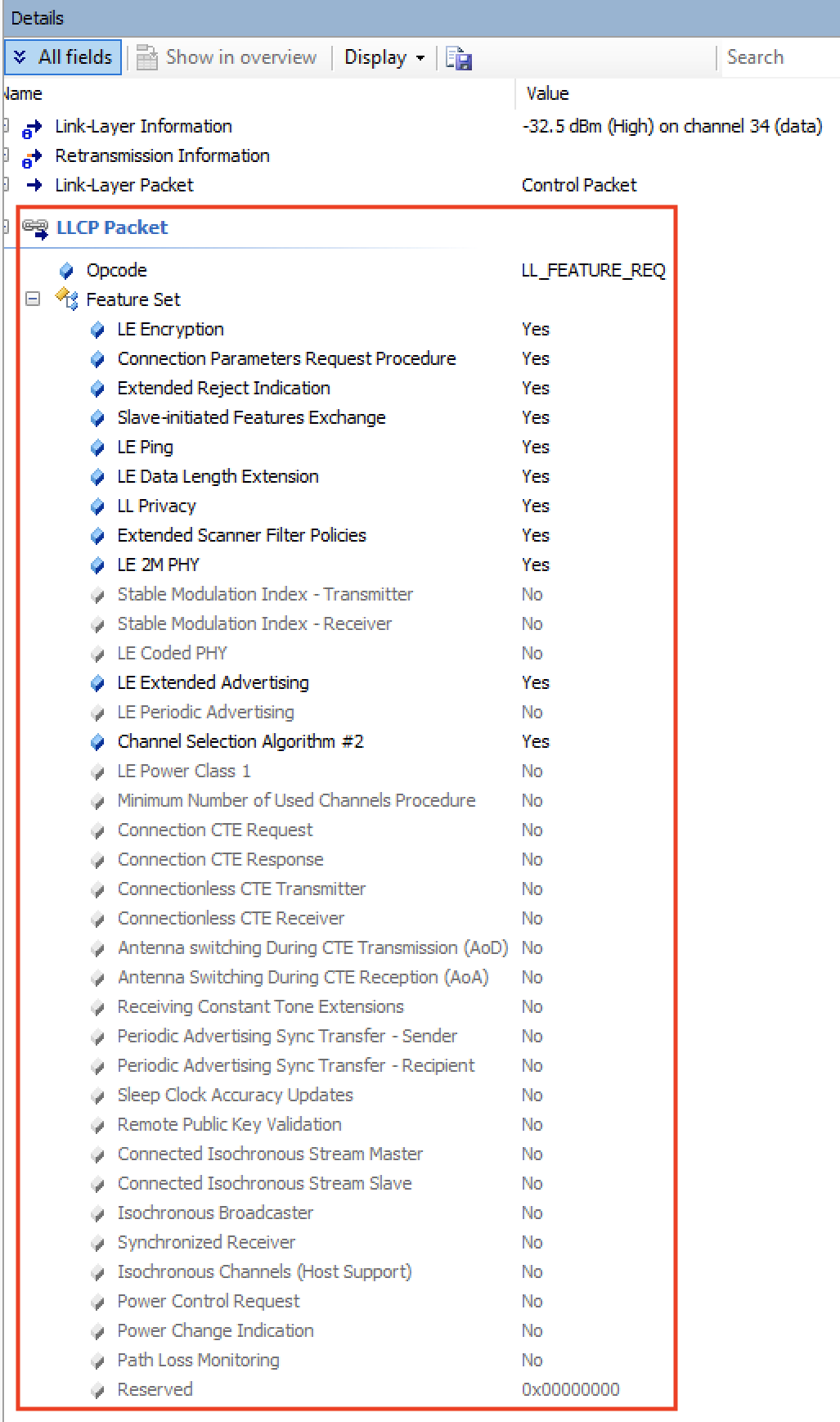
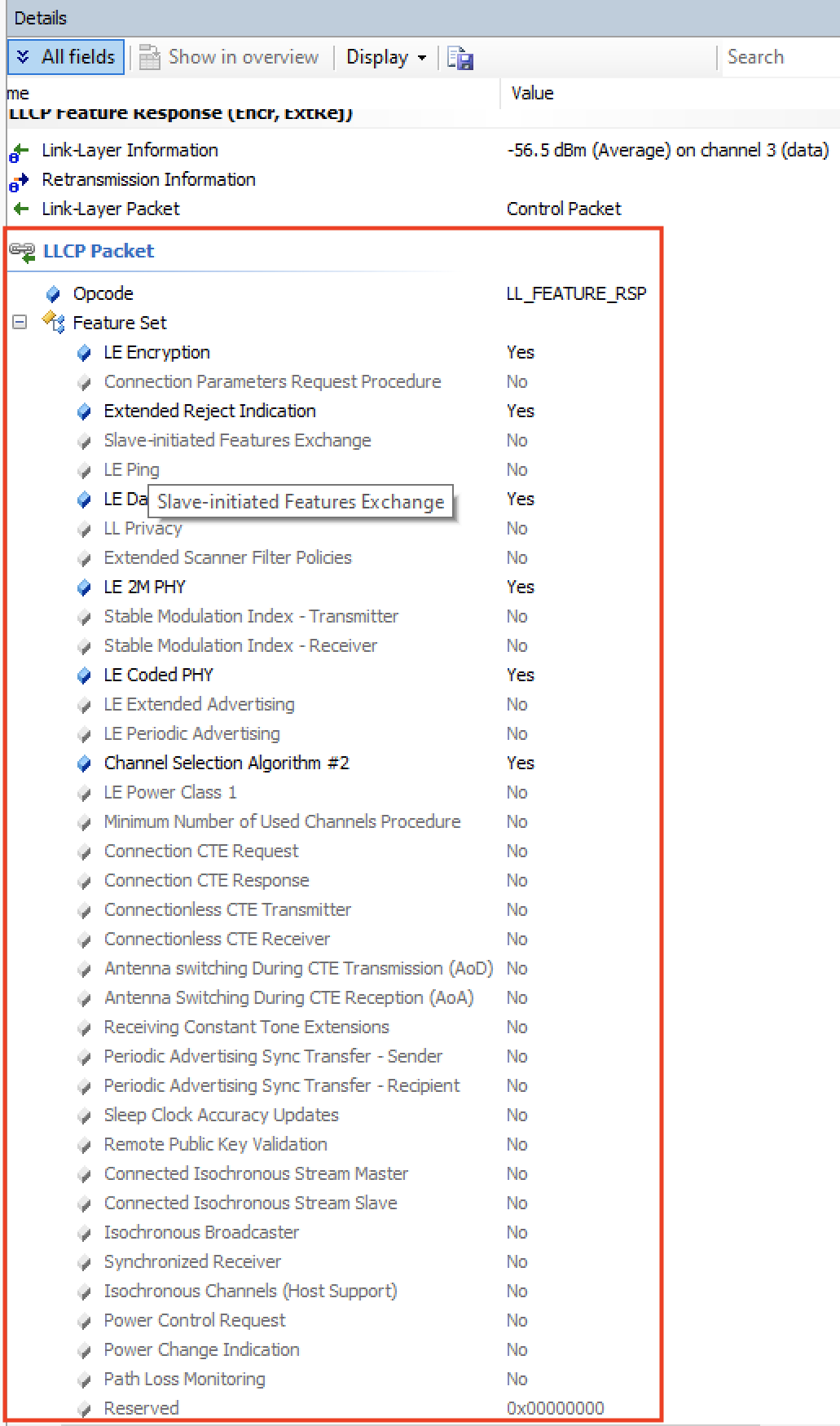
One of the devices sends the LL_FEATURE_REQ listing all the features it supports, and the other device responds back with an LL_FEATURE_RSP listing the features it supports.
As of version 5.1 of the Bluetooth specification, there are 28 defined bits that indicate whether a feature is supported or not.
Let’s take a look at the list of features supported by each of the devices in our example.
iPhone:
Nordic Dev Kit:
Exchange MTU
First, let’s define what MTU is:
MTU stands for Maximum Transfer Unit and it defines the maximum amount of data that can be handled by the transmitter and receiver and which they can hold in their buffers.
There is no limit per the spec on how high the MTU value can be, but the specific stack in use may have its own limitations.
The effective MTU gets determined by the minimum value of ATT MTU that the client and server support.
For example, if a client supports an ATT MTU of 100 bytes and the server responds that it supports an ATT MTU of 150 bytes, then the client will decide that the ATT MTU to be used for the connection from thereon is 100 bytes.
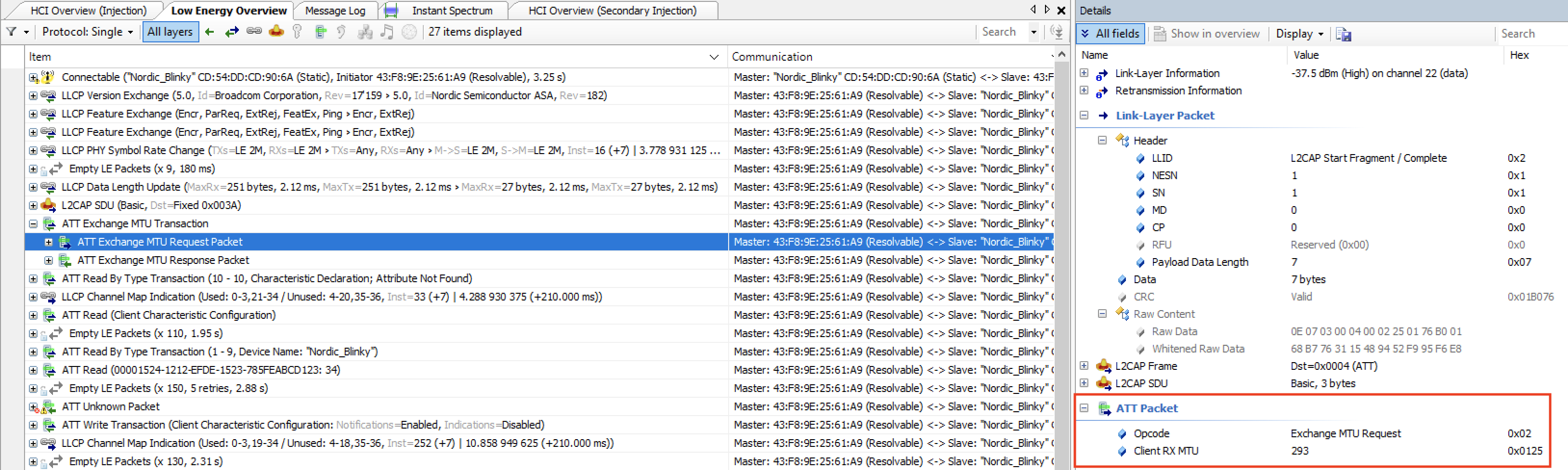
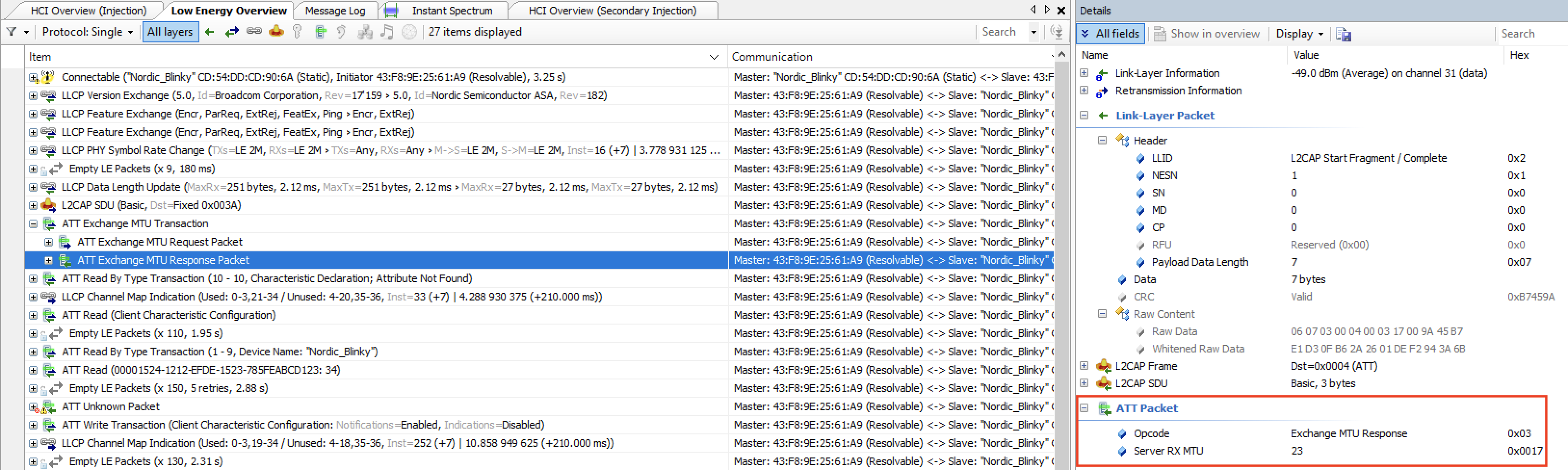
Here’s a look at the Exchange MTU packet in our example. The client (iPhone) sends an Exchange MTU Request packet and the server (Nordic DK) sends back an Exchange MTU Response packet.
Exchange MTU packet sent by the iPhone, with an MTU value of 293 bytes:
Exchange MTU packet sent by the Nordic Dev Kit, with an MTU value of 23:
Attribute Discovery
The Attribute discovery process happens whenever two devices connect to each the first time.
After that, the client may cache all attributes (including services, characteristics, descriptors, etc.) to avoid performing the discovery process the next time the two devices connect.
If a client does not cache the attributes, then it must perform the discovery process each time it connects to the server.
The attribute list will contain a key-value pair for each of the attributes with an Attribute Handle being the key and the Attribute Type (UUID) being the value.
If the server would like to support changes in the attribute handles (e.g. due to a firmware update or factory reset), then it must include the Service Changed characteristic to notify the client that an attribute handle has changed, which in turn triggers a service discovery.
Here’s a look at what the discovery process looks like:
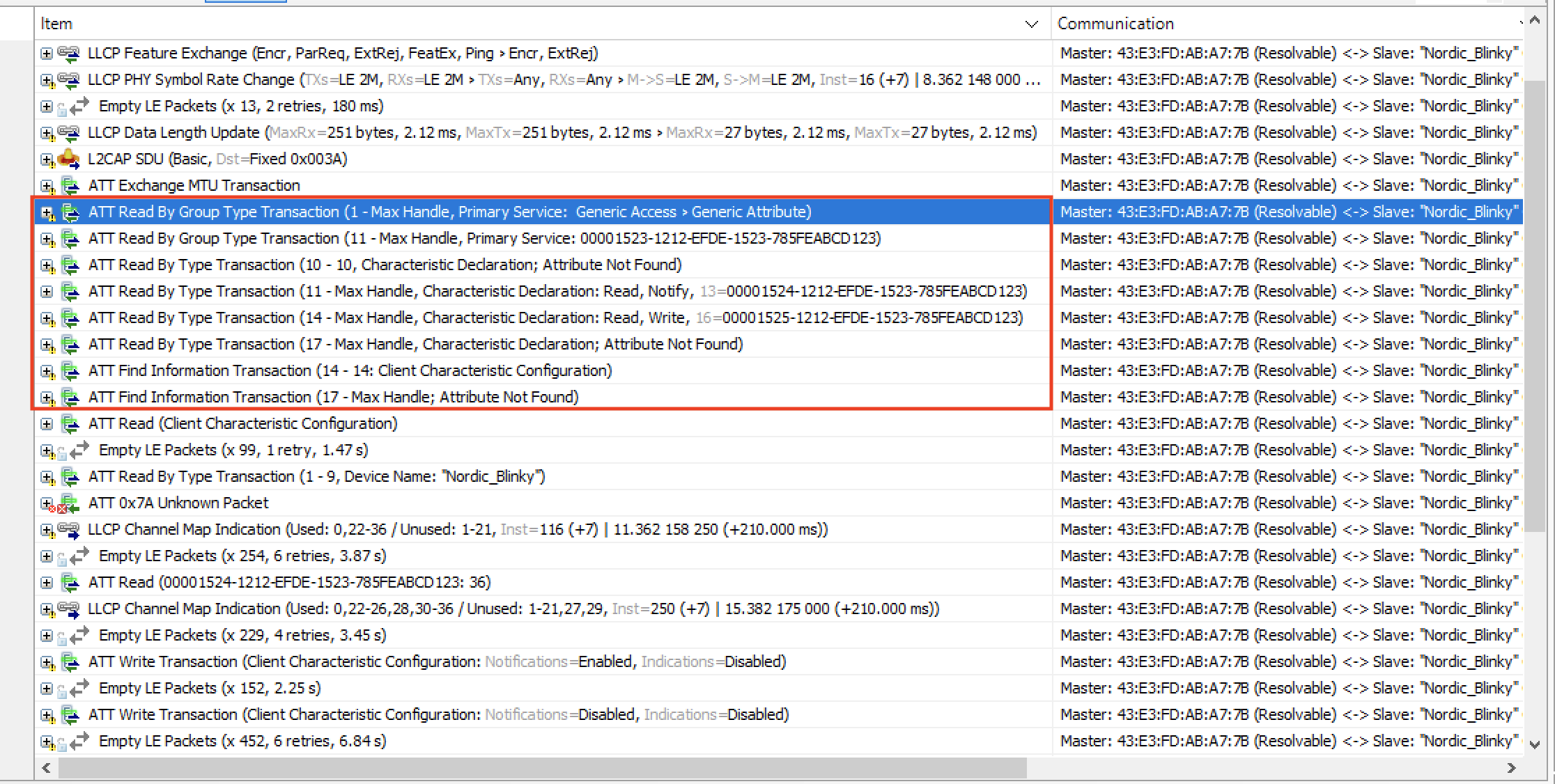
As you can see, this usually requires multiple packets especially if there are many defined services and characteristics on the server-side.
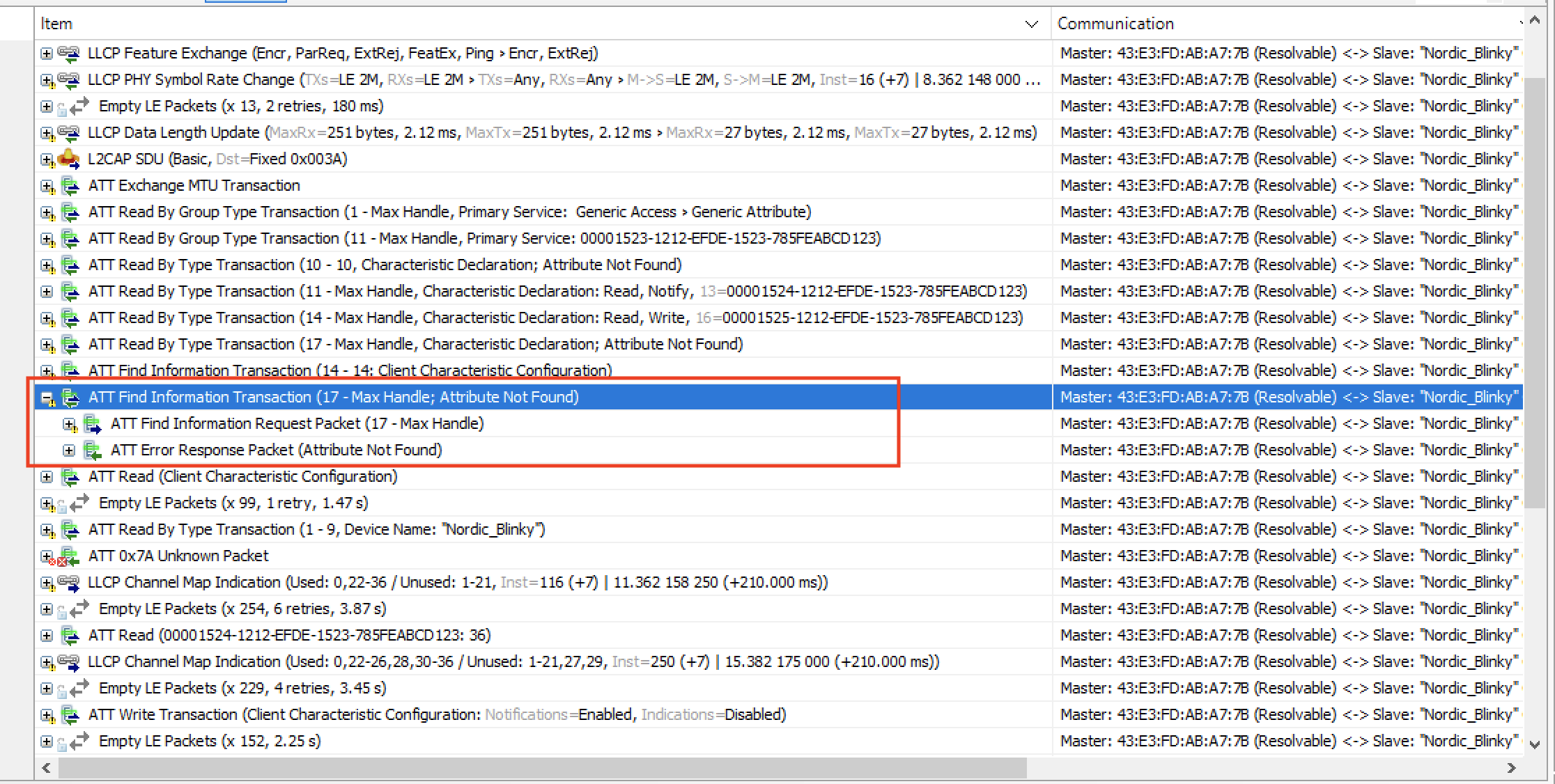
The client keeps requesting to read the Attributes until it receives “Attribute Not Found” error message which indicates the end of the discovery process:
Reading the Device Name
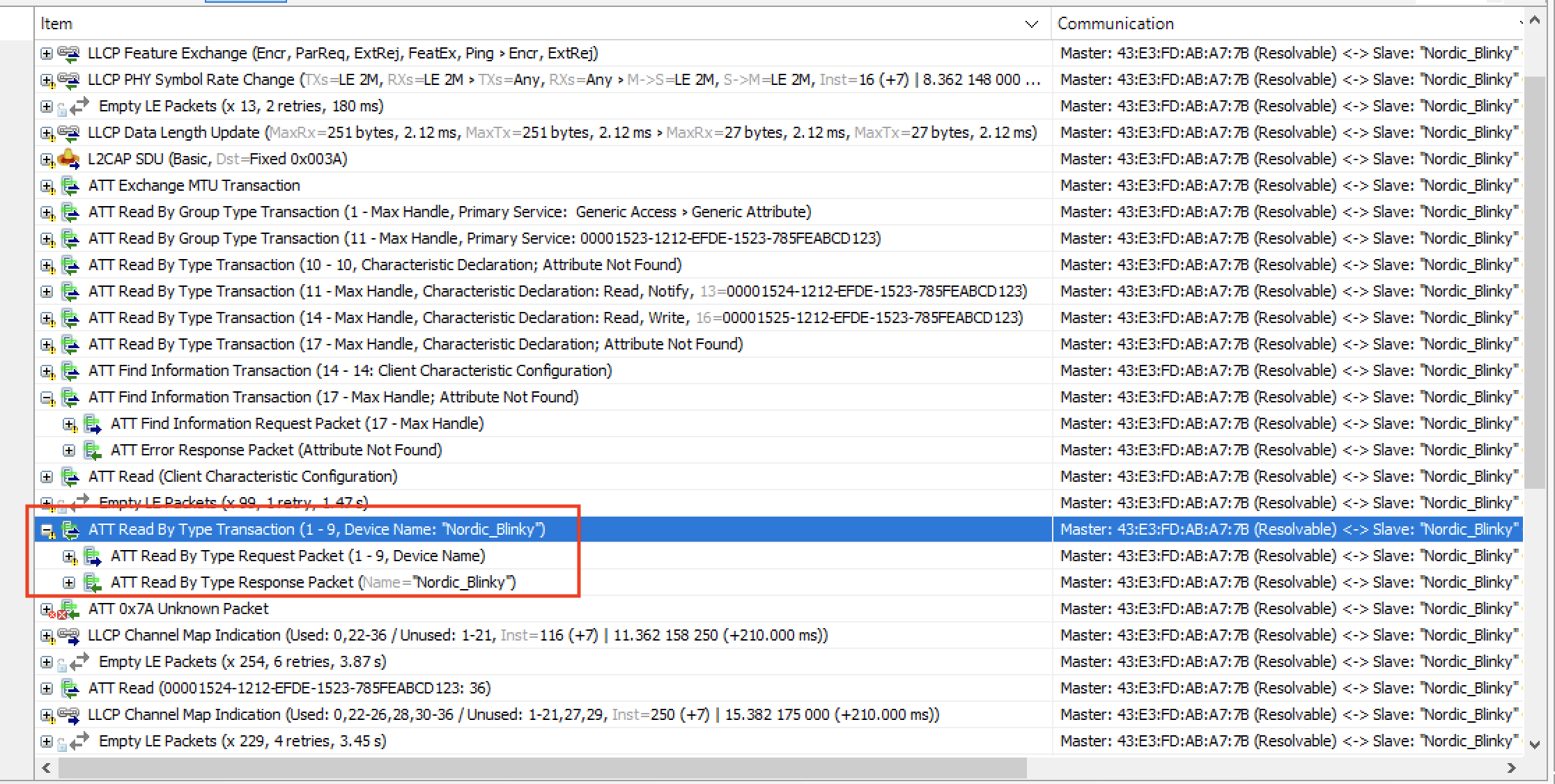
Another request that usually gets sent by the client (especially in applications that have a UI element) is reading the Device Name.
This is a simple Read Request GATT operation:
Conclusion
We covered a lot in this post! Let's do a quick recap of what we went through:
- Advertisement packets — we analyzed both nonconnectable scannable and connectable scannable types, and I walked you through the raw data byte by byte (including the LTV-formatted AdvData fields)
- Connection request packets — we broke down the LLData fields that define how the connection will operate (interval, latency, channel map, hop increment, and more)
- Post-connection operations — we looked at version exchange, feature exchange, MTU negotiation, and the GATT attribute discovery process
I've found that being comfortable reading packets at the bit level makes a huge difference when you're trying to track down issues in your Bluetooth LE applications. If something isn't working as expected, a sniffer capture will almost always point you in the right direction.
There are, of course, many more Bluetooth LE packets and events beyond what we covered here, including GATT operations (Read, Write, Notifications, Indications) and miscellaneous events like Connection Parameters Update, PHY Update, and Data Length Extension (DLE).


