


Sponsored by Silicon Labs
If you've wondered whether advertising in Bluetooth Low Energy can be bidirectional, then this post is for you. If you've recently come across the term PAwR and you've wondered what it means, then this article is also for you.
But first, a bit of background information...
Introduction
Since the introduction of Bluetooth Low Energy in 2010 (in version 4.0 of the Bluetooth Core Specification), the advertising feature has proven to be a game-changing new topology for the standard. It’s specifically great for broadcasting data in one-to-many applications (e.g., beacons).
However, it’s always been unidirectional, which means it was very limiting and not feasible for many use cases. In these cases, developers have had to resort to designing systems that rely on connections between Bluetooth LE devices.
Unfortunately, one of the most significant downsides of connections is that only a limited number can be established from one device. This is primarily due to the following:
- Each connection requires continuously dedicated radio airtime to exchange data and even to keep the connection alive (in the case that no data is exchanged), which means it can only support so many connections before it runs out of airtime.
- Each connection requires the use of additional memory resources. With memory resources usually being very limited, especially on embedded devices, this can quickly add up, so Bluetooth stacks usually limit the number of connections supported.
Due to these limitations, connections are not suitable for large-scale network deployments.
One solution to the large-scale/many-devices communication dilemma is to use Bluetooth mesh, which enables many-to-many communication. However, mesh does not serve well for centralized applications (think a star topology. E.g., thousands of nodes monitored/controlled by a single access point), nor is it well suited for low-power applications in battery-operated devices.
Periodic Advertising with Responses (PAwR)
That was the case until January 2023, when a new version of the Bluetooth Core Specification was released, version 5.4, and an exciting new feature called Periodic Advertising with Responses (PAwR) was introduced.
PAwR builds upon a couple of relatively new features of Bluetooth LE: Extended Advertising and Periodic Advertising (both introduced in version 5.0). It solves a significant problem that couldn’t be solved with Bluetooth advertising or connections before:
Achieving large-scale communication (not possible with connections) that's also bidirectional (not possible with advertising). So, it’s, in fact, the best of both worlds!
In this article, we will:
- Recap the foundations and building blocks of PAwR
- Explore what PAwR is and how it works in detail
- Go over the general steps of designing a PAwR system
- Talk about the different types of applications that would benefit from implementing PAwR
- Explore the use of PAwR in combination with Coded PHY (long-range mode) for expanding the range
PAwR vs. Bluetooth mesh
While Bluetooth mesh can serve as a solution for large-scale bidirectional communication, it’s suitable for different applications than PAwR. Let’s take a look at the differences between PAwR and Bluetooth mesh systems:
| Protocol ➡ Aspect ⬇ | PAwR | Bluetooth mesh |
|---|---|---|
| Topology | Centralized (star), 1-to-many | Decentralized (mesh), many-to-many |
| Collision Mitigation | Response slots assignment for nodes to eliminate collisions | No collision mitigation available |
| Range | Long-range via Coded PHY | Long-range via relay nodes |
| Security | Optional security via Encrypted Advertising Data (EAD) | Security is mandatory |
| Power Consumption | Low-power by design | A limited number of low-power nodes |
| Scalability | Support for over 10,000 nodes | 1,000s of nodes |
| Complexity | Simpler to implement | More complex to implement |
A table comparing PAwR to Bluetooth mesh
Let’s break it down based on the most crucial aspects:
- Power consumption: Bluetooth mesh does not support creating a system mainly comprised of low-power devices. PAwR, on the other hand, is optimized for low-power nodes.
- Topology: if you are looking for a centralized (star topology) type of system, then PAwR is the way to go. This makes sense in applications that require a centralized device (such as a gateway, router, or access point) to communicate with thousands of nodes. Bluetooth mesh operates in a many-to-many style where self-healing is one of its primary goals, so it's a more decentralized system.
- Collision: with PAwR, response slots are assigned to individual nodes, leading to collision mitigation. This is not possible with Bluetooth mesh since it's based on traditional Bluetooth LE Advertising methods.
- Complexity: PAwR systems are much simpler to implement in terms of the features required by the stack. Bluetooth mesh requires a more complex implementation, a more complex stack, and a more complex system deployment.
As you can see, the two types of systems have quite a few differences. PAwR fills a noticeable gap where Bluetooth mesh was sometimes chosen as a viable solution, only due to the lack of options and not because it was the best fit.
How does PAwR work?
To understand how PAwR works, we have to revisit a few important concepts in Bluetooth Low Energy: Advertising, Extended Advertising, and Periodic Advertising. Let’s briefly revisit each of these before getting into the details of PAwR.
How Bluetooth Low Energy Works: Advertisements (Part 1)
How Bluetooth Low Energy Works: Advertisements (Part 2)
Bluetooth LE Advertising
Advertising is a crucial part of any Bluetooth-connected system. It’s the way by which Bluetooth LE (peripheral/broadcaster) devices get discovered. This works by sending packets on all (or a subset) of the three primary advertising channels (labeled 37, 38, and 39).
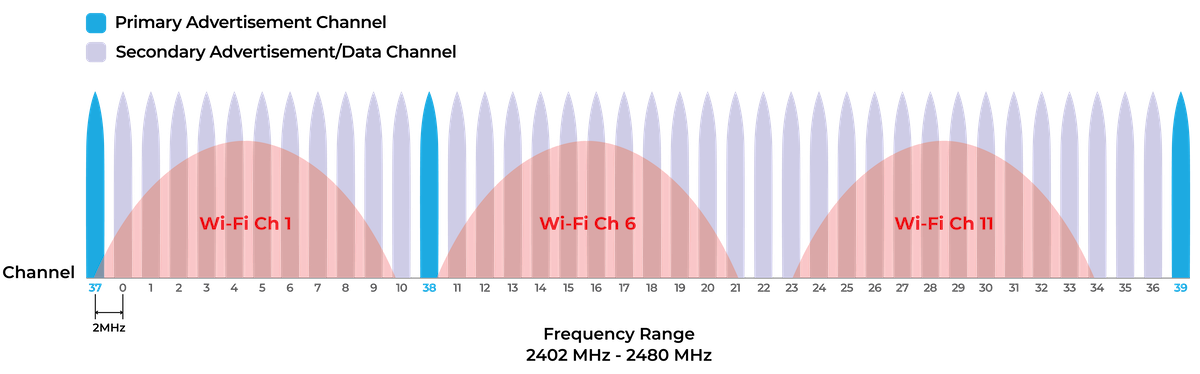
A few important notes on advertising packets (referred to as advertising PDUs):
- There are multiple aspects that characterize advertising PDUs: connectable vs. non-connectable, scannable vs. non-scannable, and directed vs. undirected
- Advertising packets can accommodate up to 31 bytes of advertising data
- Advertising data included in the packets include zero or more 3-tuples, each made up of length - type - value (LTV)
- Examples of advertising data types include: Tx power, Device Name, Manufacturer Specific Data (which is provided as a way to include proprietary data).
- Since length and type are both mandatory for each advertising data type, it reduces the space available for actual data in the advertising packet. For example, if an advertising packet were to include only a long device name, the maximum number of bytes available for that string would be 31 - 1 (length) - 1 (type) = 29 bytes.
- Due to the proliferation of Bluetooth LE devices, the three primary advertising channels have become increasingly congested. We’ll see in the next section how Extended Advertising was designed to overcome this (partially).
Bluetooth LE Extended Advertising
In Bluetooth version 5.0, a new feature called Extended Advertising was introduced. The goal was to offset as much of the advertising data to less congested channels and allow the sending of more data than what can fit into a single primary advertising packet (up to 254 bytes in a single packet or up to 1650 bytes via packet chaining).
This is how it works:
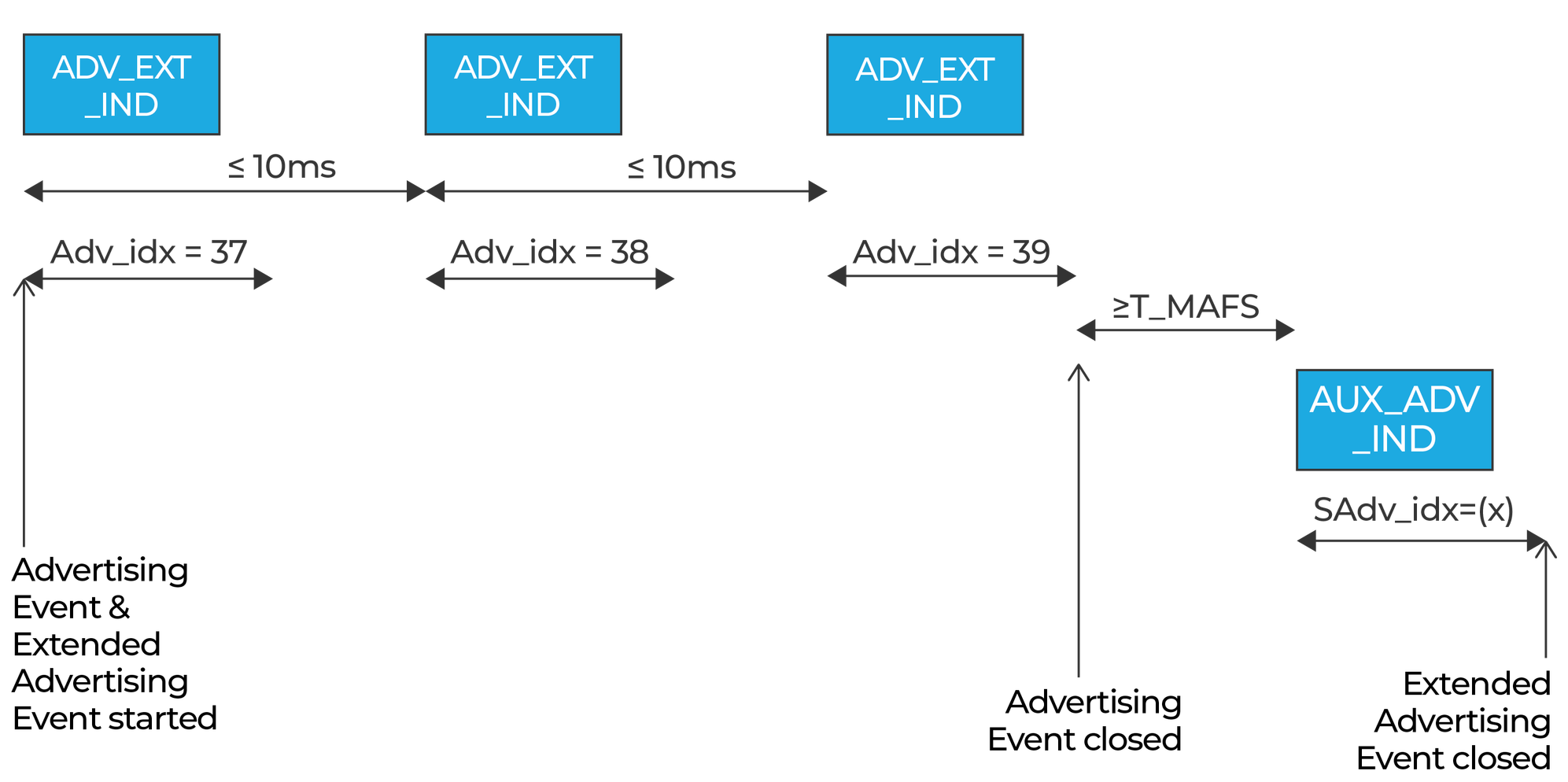
1. The advertising device sends packets (ADV_EXT_IND) on the three primary advertising channels (or a subset of them)
2. These packets do not contain any advertising data. Rather, they contain what’s called an auxiliary packet pointer (AuxPtr).
3. This pointer includes the following information: channel index, clock accuracy, offset units, auxiliary offset, and auxiliary PHY
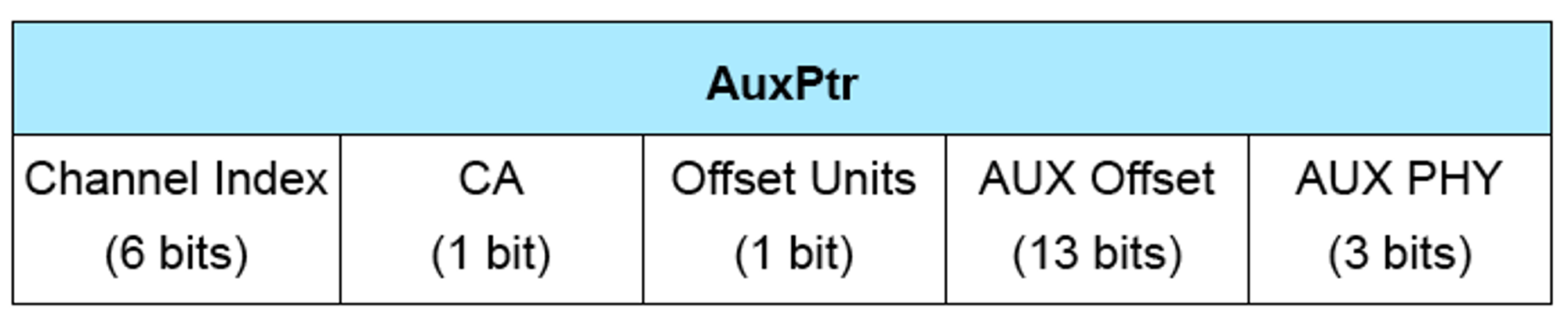
4. This information helps a scanner locate where the upcoming extended advertising packet is sent on the secondary advertising channels (0-36)
5. The advertising packet sent on the secondary advertising channels (AUX_ADV_IND) is the one that contains the actual advertising data
6. Extended Advertising packets sent on the secondary advertising channels can contain up to 254 bytes of advertising data
7. Chained Extended Advertising allows sending multiple consecutive Extended Advertising packets that can total up to 1,650 bytes of advertising data
Here’s a diagram showing an example of one scenario:
Bluetooth LE Periodic Advertising
Now that we’ve learned about Extended Advertising let’s cover another essential feature of Bluetooth LE: Periodic Advertising.
Periodic Advertising takes advertising to a whole new level. It provides a way for scanning devices to synchronize to a “train” of advertising packets that are used to send out advertising data (that’s usually changing). A good example of this might be a system comprised of multiple temperature sensors, each sending out its latest temperature readings along with timestamps at regular intervals.
The two main advantages of Periodic Advertising are:
- It allows an unlimited number of scanning devices to synchronize to one or more peripherals and receive their advertising data at predictable fixed intervals without needing to establish a connection
- It helps reduce power consumption, even at the scanner side, since the scanning devices only need to turn on the radio at pre-defined intervals after they’ve synchronized to the periodic advertising train (vs. having to continuously scan for legacy or extended advertising packets that are not transmitted at deterministic times)
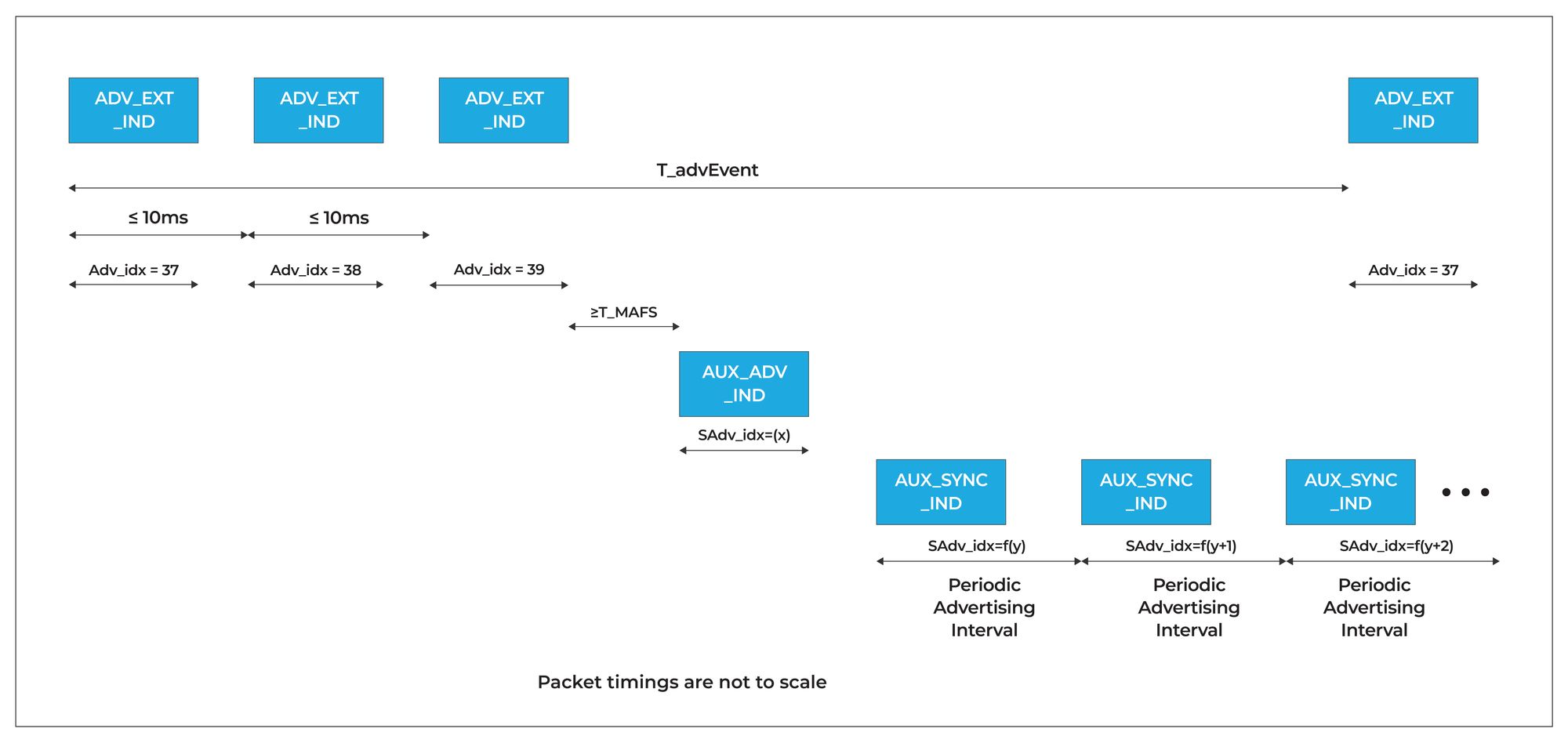
Periodic Advertising does require the use of Extended Advertising in order for the scanner to discover and synchronize with the Periodic Advertising train. So, that is a minor downside since the scanner will have to go through the following sequence at least once:
- Discovering extended advertising packets sent on the primary advertising channels (
ADV_EXT_IND) - Parsing these advertising packets to find where and when the auxiliary advertising packets are sent on the secondary advertising channels (via the
AuxPtrfield) - Locating (and then parsing) the auxiliary advertising packets (
AUX_ADV_IND) to find out how to locate the periodic advertising train (via theSyncInfofield) - Finally, synchronizing to the periodic advertising train of packets (
AUX_SYNC_IND), which are consistently being transmitted at fixed precise intervals (Periodic Advertising Interval)
Here’s a diagram showing what this looks like:
Bluetooth LE Periodic Advertising with Responses (PAwR)
Now that we’ve covered all the background information on advertising and how periodic advertising trains are synchronized to, we are ready to tackle Periodic Advertising with Responses (PAwR).
PAwR takes Periodic Advertising to the next level. It was introduced primarily for the application of Electronic Shelf Labels (ESLs). Accompanying its release in the 5.4 specification, a new ESL Profile specification was also released. It specifies exactly how the PAwR feature is used for ESL applications and introduces it as a Bluetooth LE standardized profile.
However, PAwR can be used in many other applications outside of ESL. Some examples include:
- Healthcare applications, such as remote patient monitoring in hospitals and medical facilities
- Industrial applications, such as condition monitoring in factories
- Smart Home applications, such as temperature, humidity, and environmental sensing in homes
- and more
The Technical Aspects
Ok, now let’s go over how the PAwR feature works. We’ll use the following diagram to explain it.
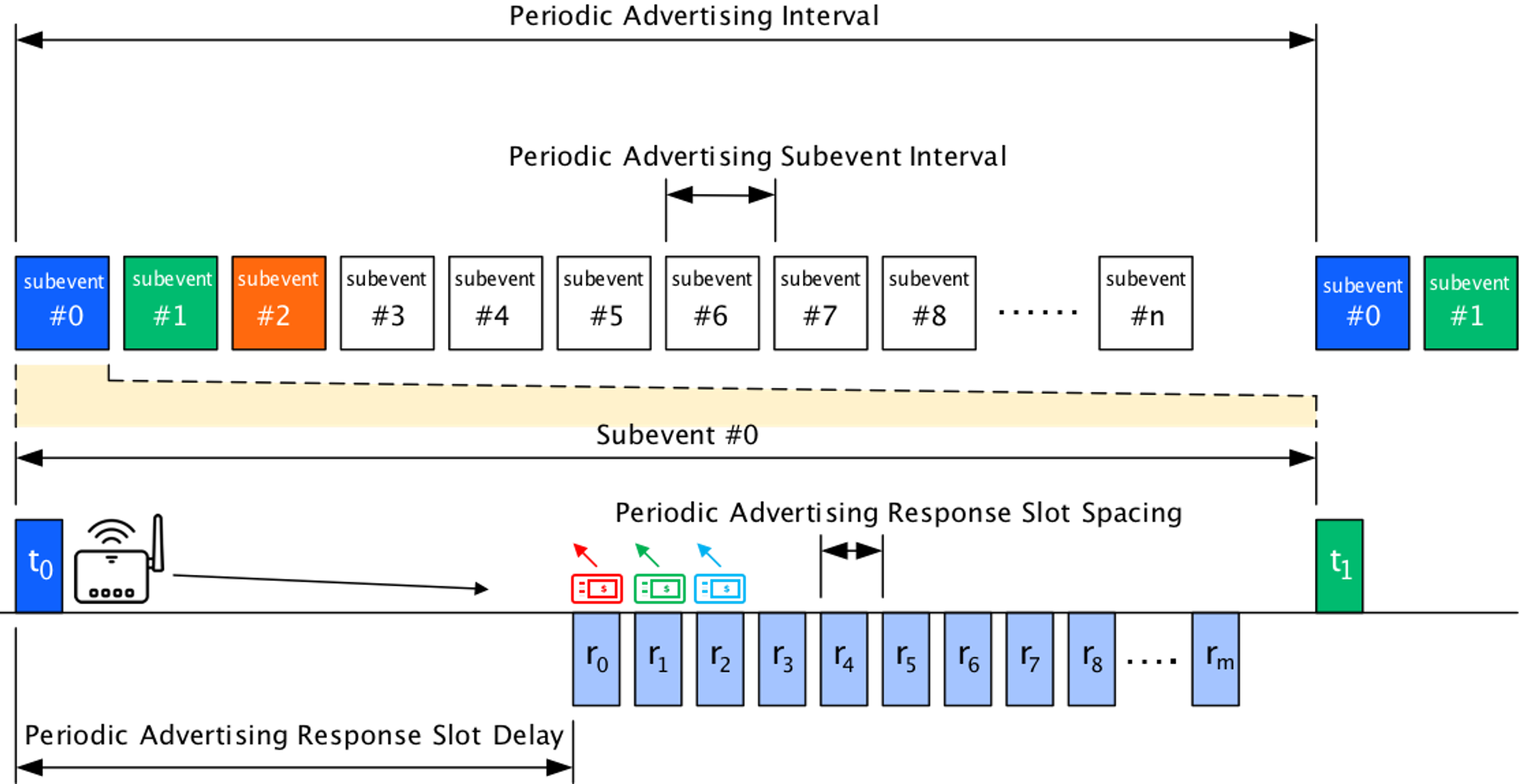
Let’s break down the different elements:
- In PAwR systems, the roles are a bit reversed from what we are traditionally used to
- The advertiser will be the “center hub” device that’s usually mains-powered (referred to as an Access Point - AP). It also acts in the role of a Central for establishing connections to the Responders in order to commission/configure the devices and for transferring large amounts of data (such as image files, firmware updates, etc.). So, this device will act in two roles: Broadcaster + Central.
- The scanner/responder devices will usually be battery-powered devices. These devices will also act as peripherals for configuration purposes and for the purpose of receiving relatively large amounts of data (such as image files, firmware updates, etc.). So, this device will act in two roles: Observer + Peripheral.
- The Periodic Advertising Interval is the same as what we’re used to with Periodic Advertising
- Periodic Advertising Interval: 7.5 ms to 81.91875 sec
- However, now we have the concept of Subevents
- Number of subevents: 1 to 128
- Subevent Interval: 7.5 ms to 318.75 ms
- Within each Subevent, we have a transmit slot where a single packet is sent by the Broadcaster
- After a specific delay from the start of the Subevent, there are a number of Response Slots defined
- Number of response slots: 0 to 255
- Response Slot Delay: 1.25 ms to 317.5 ms
- Response Slot Spacing: 0.25 ms to 31.875 ms
PAwR System Design
The most crucial part of designing a PAwR system is going to be defining the timing parameters for the system (Periodic Advertising Interval, Number of Subevents, Subevent Interval, Number of Response Slots, Response Slot Delay, Response Slot Spacing).
Why is this crucial?
Because each packet requires a specific amount of time to be transmitted, we need to consider the time required to send the maximum-size packet and ensure it fits within the timing periods defined in the PAwR system.
PAwR Timing Parameters
This is what the design thought process could look like for such a system:
- Define the Periodic Advertising Interval
- Keep in mind that the longer the interval, the higher the latency, but that leads to lower power consumption. So, we need to strike a balance with the interval value we choose.
- This interval value should also be revisited after defining the below parameters to ensure the most efficient design.
- Define the Number of Subevents
- This would depend on the application and use case. For example, how many end nodes (scanning devices) will there be?
- Subevents can be used to group a set of devices so they see and receive the same advertising data at the same time (synchronized).
- Devices can also be assigned different Subevents so each can be targeted independently.
- As an example, we could have five devices, each assigned a specific Subevent (total of 5 Subevents), and then a 6th Subevent to send data to all of these devices as a group. This would lead to a total number of Subevents of 6.
- Define the Subevent Interval
- The Subevent Interval would be defined based on the number of subevents and the Periodic Advertising Interval
- It also needs to accommodate the time it takes to transmit the packet sent by the AP, the Response Slot Delay (which we can define later), and the time it takes to transmit the total number of Responses (which we can also define later)
- The Number of Responses will be shared across all Subevents. Going back to the example described above, even if only one device responds in 5 of the defined Subevents (Subevents #0-4) and we have Subevent #5 where all 5 Responders are sending responses, we would need to define the Number of Responses to be 5 (which will be defined across all Subevents).
- Define the Response Slot Delay
- This needs to accommodate the time it takes to transmit the packet from the AP
- It also should take into account the maximum amount of time needed for processing on the receiver nodes to prepare the responses
- Define the Periodic Advertising Response Slot Spacing
- This needs to accommodate the amount of time it takes to transmit a packet of the maximum expected size from the responders
- After the parameters are designed, they should be revisited to ensure that they are defined to achieve the most efficient design
As you can see, defining the PAwR timing parameters is pretty involved and not entirely straightforward. So, the system architect should probably spend enough time designing these parameters and even prototyping and testing them out on a real system to validate the design.
Security and Encryption of Advertising Data
In some use cases, devices in a PAwR system transmit sensitive data, or they simply don't want the data to be exposed to other devices in the area. Sounds like a great candidate for encryption and security, right?
Traditionally, encryption of (and securing) advertising data was not defined in the Bluetooth specification and was left to implementation at the application level. Fortunately, along with the introduction of PAwR in version 5.4, a new feature called Encrypted Advertising Data (EAD) was introduced. This feature solves the issue at the protocol level, which means it's standardized and can be used across devices from different vendors.
The one caveat for utilizing this feature is that it requires two Bluetooth LE devices to connect and pair (at least once) in order to exchange the information necessary for the decryption of the advertising data by the scanner device.
Here’s a high-level overview of how it works:
- A new characteristic called “Encrypted Data Key Material” is added to the GAP service of the peripheral device
- This characteristic provides the basis by which a peripheral device can share the information needed to decrypt its encrypted advertising data
- This requires the central device to connect to the peripheral then:
- read this characteristic and
- subscribe to indications in order to receive the new value if it ever changes.
* This is required in order to be able to decrypt the encrypted data in the advertising packets
- A new AD Type called Encrypted Data is used to encapsulate the encrypted advertising data
- The encrypted advertising data may contain multiple AD Types within the single payload. In this case, the AD structures are concatenated first before being encrypted
Without implementing the new EAD feature, you will have to either handle the encryption of your device’s advertising data at the application level. In highly sensitive use cases, you may still want to add app-level encryption to achieve higher levels of data security.
In the near future, we'll cover this feature in more detail including a walkthrough of implementing it.
Important Design Aspects
Here are some important aspects to keep in mind when designing a PAwR-based system:
- The Core Specification (≥ version 5.4) defines the foundation for a system utilizing this feature, specifically regarding the timing conditions and value ranges, packets, and methods/operations used. The rest is left up to the implementation.
- Examples of aspects left to implementation include:
- Defining the number of response slots
- Defining the groupings of end-nodes
- Assigning the Subevents to each end-node
- Assigning the response slot for each end node
- Defining the payloads of the messages sent from the advertiser to the end-node devices, and vice versa
- and more
- Assigned response slots allow the system to handle thousands of nodes (over 10,000) without suffering from collisions since each node is assigned a specific response slot to respond in. This ensures that each device is using a specific assigned time period to send data back to the AP when no other device is allowed during that time period.
- Response slots assignment is left to the implementation and can be defined in different ways. They can be:
- Assigned to each node in the packet sent by the AP (potentially split between devices across multiple Subevents)
- Assigned to each node via a GATT operation during a connection between the AP and the end node
- Hardcoded assignment at each end node
Going the Distance!
In contrast to Bluetooth mesh, PAwR does not operate in a way where nodes can relay messages to increase the coverage of the network. Instead, it is exactly like a traditional Bluetooth LE system, where devices are mainly communicating directly with each other.
So, to increase the coverage area and distance for communication, we would need to utilize Bluetooth's Coded PHY (long-range) feature instead. I won't be going into a lot of detail on Coded PHY since I've already covered it in a previous blog post:
The main aspect (yet again!) of designing a PAwR system is defining the timing parameters. This is further emphasized when utilizing Coded PHY.
Ok, you may be wondering: why?
This is due to the fact that a Coded PHY packet is larger than a traditional (1M PHY) Bluetooth LE packet, which means it requires a longer time to transmit.
By how much? Good question! Let's dig into this.
For the 1M PHY, here's what the packet transmission timing looks like:
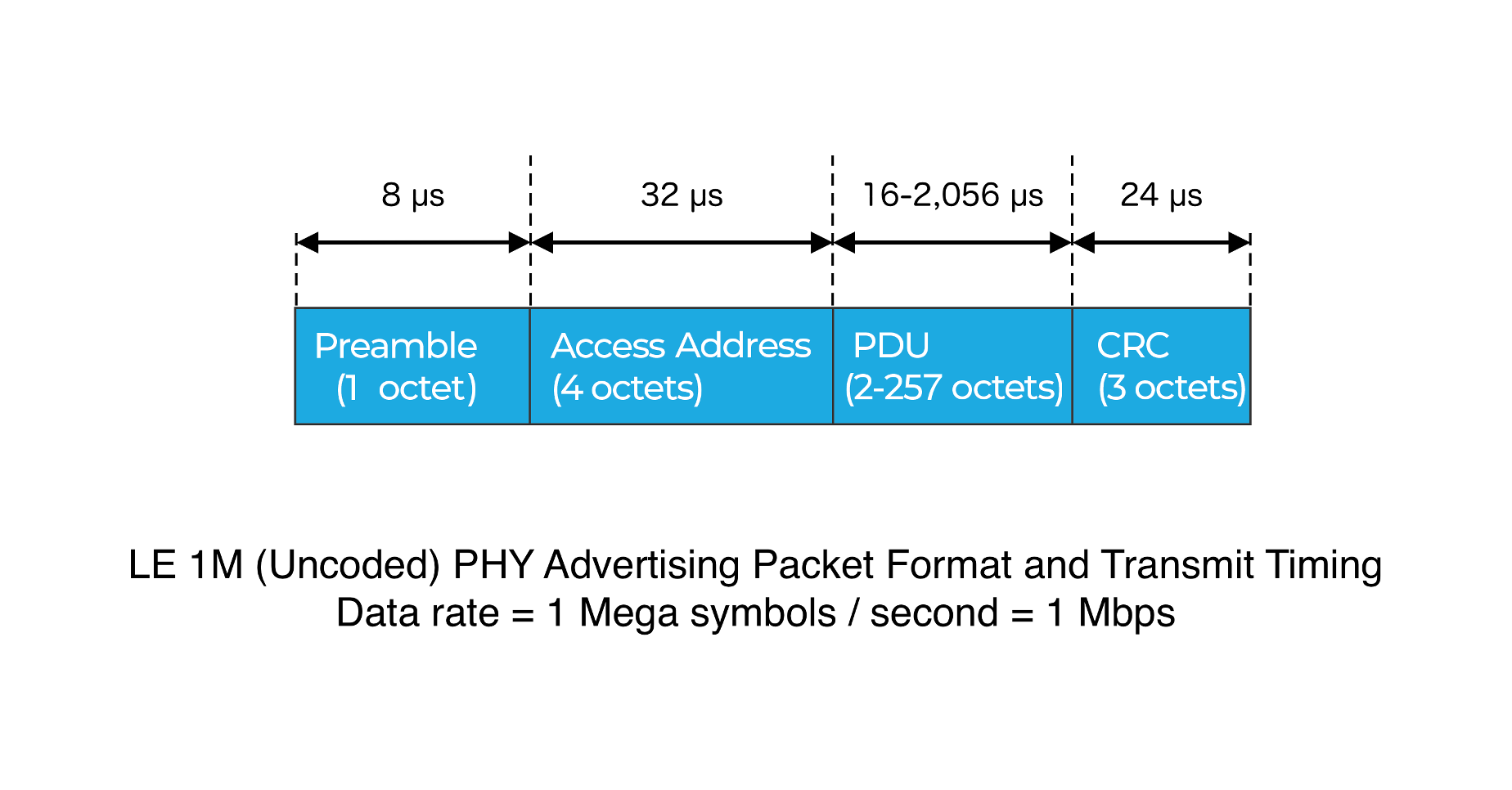
In contrast, here's what the transmission timing for a Coded PHY packet looks like:
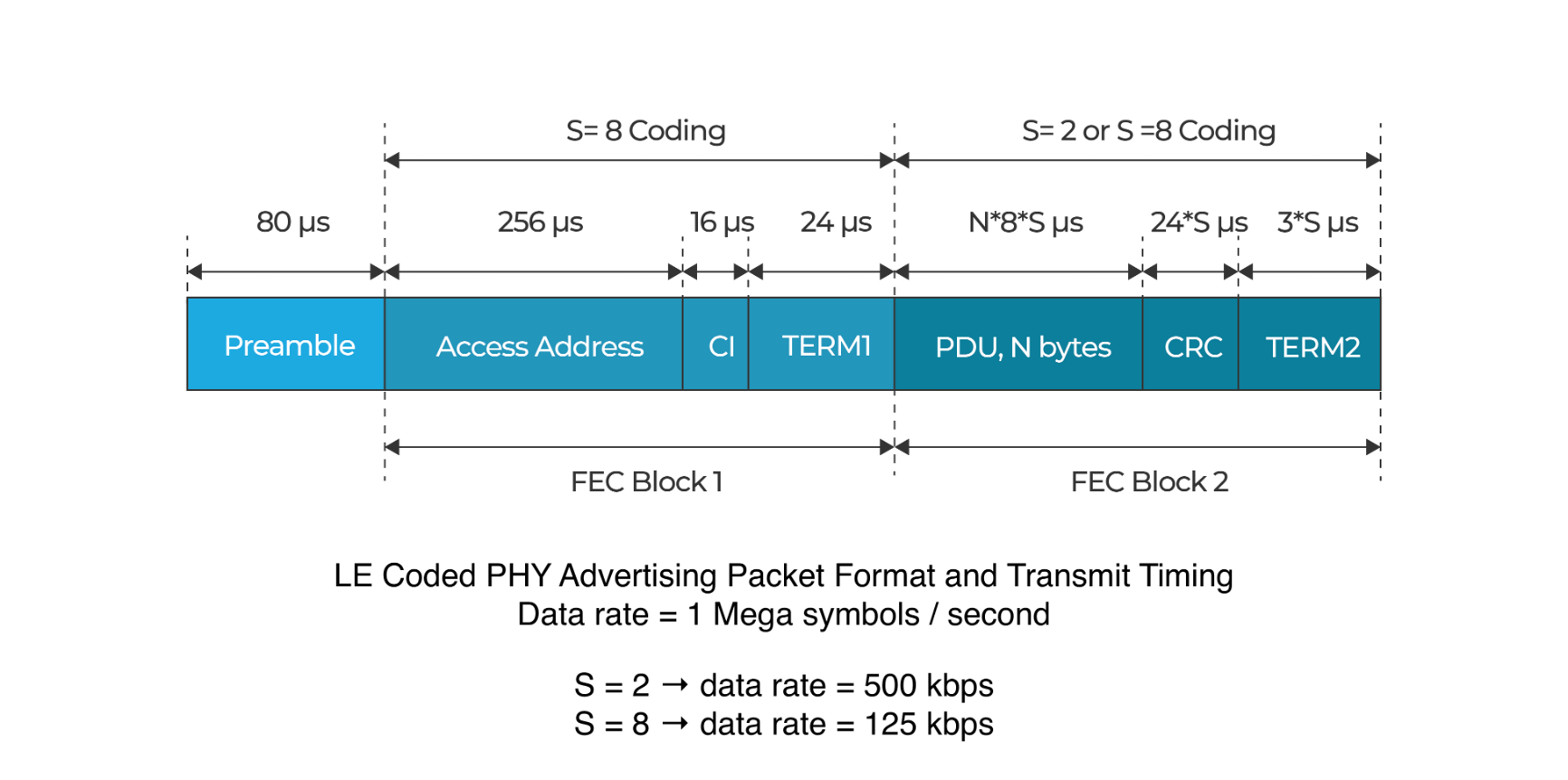
LE Coded PHY vs. LE 1M PHY Packet Transmission Duration
As you can see, in the case of Coded PHY, the timing varies depending on the Coding scheme used (S=2 vs. S=8), but in either case, it is much longer than when using the 1M PHY.
So, the important point is to ensure that when designing a PAwR system that uses the LE Coded PHY, you want to pay close attention to the packet duration and design the system timing parameters accordingly.
To recap and make things easier to calculate, here's a list of equations (rough timing estimation) that can be used as a guideline for defining the timing parameters of a PAwR system:
- Periodic Advertising Interval > (# of SubEvents * Subevent Interval)
- SubeventInterval > Response Slot Delay + (# of Response Slots ∗ Response Slot Spacing)
- Response Slot Delay > Amount of time needed to transmit a Transmit packet
- Response Slot Spacing > Amount of time needed to transmit a Response packet
PAwR + Coded PHY (S=8) Demo
To showcase the potential of using Coded PHY in combination with PAwR to achieve longer-range communication, I've built a demo using a few Silicon Labs development kits and based on an existing example provided by Silicon Labs.
The example is called "Bluetooth - PAwR Thermometer". It does not utilize Coded PHY (instead, it uses the standard 1M PHY), so changes had to be made to support that in addition to re-designing the PAwR timing parameters of the system.
You can find the example on Silicon Labs' GitHub repo here.
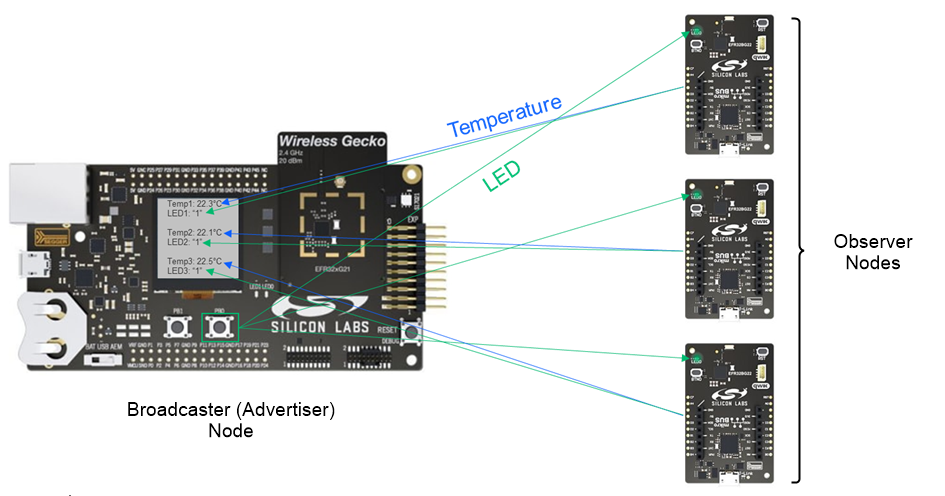
Ok, onto the video. Enjoy!
Summary & Recap
In this article, we covered a lot of ground (no pun intended!):
- The reasoning and history behind the new Periodic Advertising with Responses (PAwR) feature introduced in Bluetooth version 5.4
- The foundations of PAwR, including LE Extended Advertising and LE Periodic Advertising
- What is PAwR?
- How does PAwR work?
- How to design a PAwR system
- Important design aspects
- Achieving longer range with LE Coded PHY
- A video demo showcasing a system designed using a combination of PAwR and Coded PHY


